Pages - Menu

Showing posts with label Dependency Injection. Show all posts

nopCommerce - AWS Migration

Scope

We are moving our existing websites to AWS EC2. From a high level perspective, our plan as follow.
  • Move the websites to EC2
  • Move the database to RDS
  • Content Images upload via CMS will go to s3
  • Product Images on the websites are moved to s3
  • Move the console apps to a t2.micro instance
We are using nopCommerce 3.3.

Implementation

Websites and Console Apps

Moving sites and apps to cloud instances are pretty straight forward. There are no code changes required in nopCommerce.

Database

We used the SQL Database Migration Wizard tool, pretty straight forward.

S3

Migration to S3 required some code changes, but we are not getting much resistance because of the advantage of using OO and polymorphism.

Previously we already wrote a custom class that inherit from the PictureService.

public class TAPictureService : PictureService, ITAPictureService, IPictureService

Now, I can inherit my custom class by my new AWS class.

public class AwsPictureService : TAPictureService, ITAPictureService, IPictureService

We will then override the image read / write method to connect to AWS. This was mentioned previously in my other post Amazon SDK S3 with .Net

In our DependencyRegister, we now register our new AWS Service.

builder.RegisterType<AwsPictureService>().As<IPictureService>();

Now my system is able to support either local or S3 images by changing the register type via DI.

nopCommerce - Multi Store / Multi Currency / Multi Price for each product

Scope

We have had a few sites went live with nopCommerce. I am in the process to replicate our existing Australia sites to New Zealands sites.
  • Both sites to sell the same products, with stocks coming from the same location.
  • Products dispatch from the same warehouse.
  • Customizable Price, Old Price and Special Price per product per store and not using any currency converter.
  • etc.

What I am trying to achieve is also described here and here by other people. Or as a workitem in codeplex. No viable solution at time of writing this article.

This is base on nopCommerce v3.3.

Business Case

nopCommerce out of the box supports multiple currencies by using a currency converter.


However, this is only practical if your company is 1 entity and want to accept orders from around the world. Currency converter provides an estimate for users on how much they will be spending, but the transaction is still processed in my primary currency - AU dollars in our case.

Example of Currency Converter from my previous project - Bardot

In our business case, we own both of the AU and NZ companies as separate business entities. Our NZ company have their own price and we would like to accept local NZ credit cards in NZ currency. In this scenario, currency converter is not a feasible solution.

Technical Overview

  • Create a new ProductPrices table to store prices for different stores
  • Create an admin screen to handle Product Prices
  • Create a GetCustomPrice() to retrieve price from ProductPrices if store id match
  • Replace any existing controllers or services that use Product.Price to use GetCPrice()

Prerequisite

Code

ProductCustomPrice


We created a new SQL table to store our custom price. 


In our code, we need to create a new domain object for ProductCustomPrice and a mapping file. This is already demonstrated in previous posts in prerequisite.

PriceCalculationService


We need to override the PriceCalculationService.GetFinalPrice() in the Product Price region to use our custom price. We will need a small refactor work in core.

// decimal result = product.Price;
decimal result = GetProductInitPrice(product);

We will write a method to retrieve the custom price from our database.

public virtual ProductCustomPrice GetProductCustomPriceByProductId(int productId)
{
    if (productId == 0)
        return null;
            
    var currentStoreId = _storeContext.CurrentStore.Id;
    var query = _productCustomPriceRepository.Table
                    .Where(p => p.StoreId == currentStoreId 
                            && p.ProductId == productId);

    return query.FirstOrDefault();
}

We will override the method in our new CustomPriceCalculationService class. It will pick up custom price if available, otherwise default.

protected override decimal GetProductInitPrice(Product product)
{
    var customPrice = GetProductCustomPriceByProductId(product.Id);

    if (customPrice != null)
        return customPrice.Price;

    return base.GetProductInitPrice(product);
}

CatalogController


We then need to do the same for OldPrice, SpecialPrice, SpecialPriceStartDateTimeUtc and SpecialPriceEndDateTimeUtc. I will leave this fun exercise for my readers. As a hint, a good starting point is to refactor the CatalogController like what we did for Price.

// decimal oldPriceBase = _taxService.GetProductPrice(product, product.OldPrice, out taxRate);
decimal oldPriceBase = _taxService.GetProductPrice(product, _priceCalculationService.GetProductInitOldPrice(product), out taxRate);

We now able show different Price and SpecialPrice for multi stores.


I built an admin screen base on the TierPrice screen and ProductCustomPrice() CRUD base on Nop.Admin.Controllers.ProductController.TierPriceList().

For example, the Reebok Core Price is $169.99 and Special Price is $118.99.

By introducing Per Store Custom Price, the Reebok NZ Local store would have a customized price of $200, an old price of $180 and a special price of $130.


Other Solutions that didn't work

Tier Price

Initially I was trying to use store specific tier price with 1 unit, and in the hope that the price will be overridden by the tier price. It didn't work in 2 aspects.

Firstly, the way how tier price works is to give a better discount for the customer if they are buying multiples. The logic in nopCommerce will check if the tier price is cheaper than the original and only apply if cheaper. Unfortunately the foreign currency is not always cheaper than the primary.

Secondly, I cannot get store specific for OldPrice or SpecialPrice.

Conclusion

This is not the best solution but the one of the possible solution. If I was a core nopCommerce developer, I would have changed the domain object to work with the prices.

I am very lucky that Australia and New Zealand use the same currency symbol. For wider audience sake, I think the solution needs to be extended to cover other area as well.

nopCommerce - Multi Tenancy - Round 3

Multi Tenancy in nopCommerce by itself seems like an on going project for me now. Previously, I talked about how I was able to create brand specific dll in one share code base. (No splitting / branching in Source Control, one code base only). I used MS Build to separate the dlls during compilation which is neat but clumsy, as most developers would overlook these places. These can be found in here.

http://tech.sunnyw.net/2014/07/nopcommerce-multi-tenancy-2.html
http://tech.sunnyw.net/2014/05/nopcommerce-multi-tenancy.html

Scope

Previously I mentioned,
nopCommerce uses App_Data\Settings.txt to store database connection string... it became a hassle to swap connection string for local development as web config transformation does not help...
The problem arise not only with development environment that I have to constantly swap connection string, but in the event of multi tenancy with same code base and separated database, the code needs to connect to the correct database automatically.

Also, this cannot be simply done by a plugin or a check of store id in nop, as we would need to connect to the right database to get the store context.

Last but not least. This article is base on nopCommerce 3.3.

Objective

  • During developments, the correct database will be picked for multiple bindings without changing Settings.txt.
  • During deployment, the correct connection string applied to the websites without manually changing the Settings.txt in production environment.
  • Conform with the nopCommerce coding standard, so we are making the least changes. Best coding practice comes after this.

Setup

For our development environment, we will add multiple domain bindings to one website.

Note we only need to bind once for all https traffic. Https binding always work on IP base not domain base, as domain information is stored in HTTP Header that is encrypted as part of the https protocol.


Although nopCommerce doesn't have multi-tenancy supported out of the box, but its multi-store functionality will help assign different stores base on the url. I have previously demonstrated that.

Note that we would not do multi binding for live environment as we still want to have separate app pool for different websites for now,

Code

Settings.txt


We need to create a bunch of Settings_{site}.txt, one for each site.

Settings_site1.txt
Settings_site2.txt
...

We will have different connection strings in each Settings.txt files.

DataSettingsManager.cs


Ideally I would like to extend this class and override the method in my own class. Unfortunately, this class does not implement any interface and no IoC involved. Plus, some vendor plugins also hard-coded the way how to instantiate this object, usually find in plugins that create their own ObjectContext.

In the LoadSettings and SaveSettings method, we will change the way how filename is picked by default to our private function.

filePath = Path.Combine(MapPath("~/App_Data/"), GetSettingFileName());

private string GetSettingFileName()
{
    var dbSettingName =  ConfigurationManager.AppSettings["DBSettingName"];
    var filePath = Path.Combine(MapPath("~/App_Data/"), dbSettingName);
            
    if (File.Exists(filePath))
    {
        return dbSettingName;
    }

    return filename;
} 

Web.config Transformation


We added a new key in the web config.
<add key="DBSettingName" value="Settings_site1.txt" />

We also need to provide transformation for each build config.
<add key="DBSettingName" value="Settings_site2.txt" xdt:Transform="SetAttributes" xdt:Locator="Match(key)" />

Switch


To switch between sites during developments, we will use SlowCheetah to help transform our web.config. The correct connecting string will be picked via web config.


Conclusion

This is a step forward towards turning our sites to true multi-tenants environment. During development, I am now able to connect to the corresponding database just by transforming the webconfig.

In the future, I am hoping a particular store will always connect to its own db even if I bind multiple sites to only one set of dlls (one IIS website). Then I will be able to scale out the websites and provide high availability.
  • Brand specific dependencies need to be removed from web.config to another persistent storage. Maybe a share database or some sort.
  • Need to change how DataSettingsManager is instantiated. It needs to be done via IoC so it can be extended.
  • Find a balanced approach for scalibility.

nopCommerce - Schedule Task Plugin

Scope

Recently having issues with the integration with our payment gateway provider. Occasionally our synchronize call to their server will not get a response back.

We are to write a schedule function to run regularly. It will pull out a list of pending orders and re-run the authorize and capture.

We are:-
  • using nopCommerce 3.3
  • utilizing the nopCommerce Schedule Task
  • using plugin approach

Technical Overview

We are to use the Nop.Services.Tasks.Task and ScheduleTaskService to create a Nop Schedule Task that runs periodically.

Implementation

Task

Firstly create a new plugin. In our plugin, we will create a MyTask class that implements ITask.


The only method in the interface is Execute(). This is the place where we will put our calling codes. In this example, I am calling my own method QueryPendingOrders().

IoC

In my example, I am using a new service class, so I will need to register the service class via IoC in our plugin. A new DependencyRegistrar class will do the trick.


Install Schedule Task

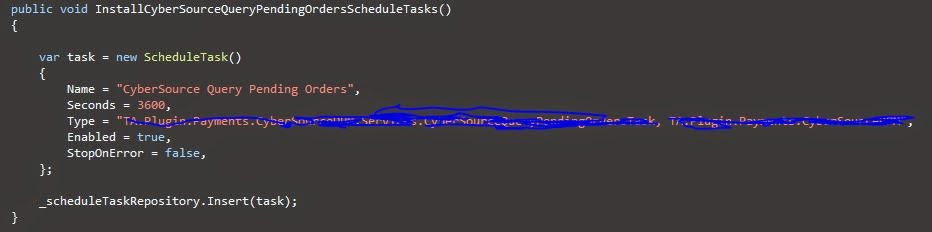
Next, we need to create a schedule task for the task. This can be done by 
the overrides of Nop.Core.Plugins.BasePlugin, In the Install() of my plugin, we will call the following.


Calling Method

For the purpose of demonstration, I am just writing to the log.


Schedule

After installing the plugin, a new schedule task is created as follow. (I have changed the run period to 60 seconds for demo)


Log

Let it run for a few minutes and check the log. It seems quite spot on that it is called every 60 seconds.


Conclusion

There was not much work involved to create a schedule task. All the magic are already done and made available for us from the nopCommerce.

During development, I noticed the TaskManager utilize singleton pattern. It is then responsible to instantiate the instances for the TaskThread. The task threads will run continuously and kick off the Execute() periodically. 

One thing I wanted to do is to compare the performance between Nop Schedule Task vs SQL Server Agent Job. I have a feeling that the sql job may run a little faster as the nop task thread is not a push notification, but simply a continuous running thread.


nopCommerce - Multi Tenancy - Round 2

Multi Tenancy in nopCommerce by itself seems like an on going project for me now. Previously (http://tech.sunnyw.net/2014/05/nopcommerce-multi-tenancy.html), I blogged about how I was able to create brand specific dll in one share code base. (No splitting / branching in Source Control, one code base only). I used MS Build to separate the dlls during compilation which is neat but clumsy, as most developers would overlook these places.

Scope

As previously suggested,
It is not so easy to deploy, as I need to build the project once per brand (so it will generate different dlls)
This technique rely on the developers to build a different BrandedService.dll that the IoC will pick up via IDependencyRegistrar. This gives different brands a slightly different set of dlls as it was hard to maintain.

At the end of this session, we want to achieve,
  • Only build once and use the same set of dlls across all brands.
  • Easy for the developers to deploy.

Code

  • We store a unique id "BrandId" in our Web.config, and of course we will utilize web config transformation for this matter.
  • In the DependencyRegistrar for each brand project, we only register the classes if the brand id matches.
  • IoC will register different concrete classes during reflection (as usual).
  • Brands without matching ids simply will have the register logic skipped (although the IoC will still run the through the class because they all implement the IDependencyRegister.
As demonstrated in code, this is the DependencyRegister for TNF.Services and Speedo.Services.


A snapshot of the bin folder shows the dlls are exactly the same for different tenants.


There will be a redundant TNF dlls in Speedo project and vice versa, but my time is more valuable than a few kb dll, so I think this is a better approach. Removal of redundant dlls will not break the site :)

Nop.Web

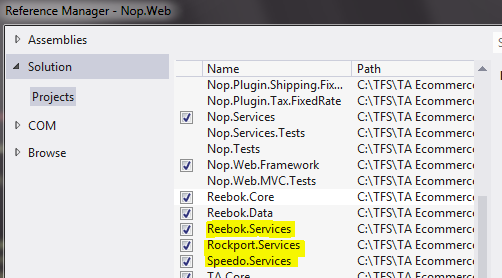
In our web project, we need to voluntarily register all our Brand.Services dll, this will force MSBuild to include all the dlls during build or publish.


Conclusion

Both of these approach have their pros and cons. I am sure there will be other ways doing this too. The key is the developers or the team must be comfortable with the process, and the people doing it are happy about it.

Further Improvement

nopCommerce uses App_Data\Settings.txt to store database connection string. This works fine for staging or live site as we just need to skip App_Data during deployment. However, it became a hassle to swap connection string for local development as web config transformation does not help in this situation. More into this topic next time.


nopCommerce - Hello World to Multi Tenancy

Finally, it is about time to do some multi tenant works. Let's recap my goal and how I am travelling so far.

Scope

  • Build a multi tenant e-commerce platform for 15 or more international brands.
  • They are completely different brands and target consumers are completely different.
  • They will share some similarities in terms of functionalities but there will be customizations for individual brands
  • Administrator of a brand can only see stuff about their own brand.
  • Easy to develop
  • Easy to deploy
  • Easy to maintain
  • There is NOT necessary a super admin role to overlook ALL the brands.
  • Customers are NOT shared across brands.

Preparation

So far, I have built my first brand with the above scope in mind, the following strategies were implemented.

Specification

Since our first site went live, we are now ready for our next brand and the following needs to bear in mind with the followings:
  • Separate the brand specific codes in separated dll.
  • Database to be considered at later stage.
  • No brand specific code at controller level.
  • Views for different brands are handled by Nop Theme.
  • We will deploy for all the brands from the same Visual Studio Solutions.

Decision Making

Get Dirty with Code


Project Setup

Notice I am skipping some of the steps and only covering the key points. (eg. Add references, routes, register dependency etc...) They are covered previously.


I created a Misc Service and an interface for our platform.


Then I create brand specific services in the relevant projects.


Build Configuration

With the default Debug configuration, we will clone a set of new build configs per projects. In each build, we only include one brand dll at a time. (Only service dll in this example)


Only for the relevant build configurations of the brand projects, we will set the dll output path to the same as the Nop.Web project.


Controller

We setup a controller that will consume ITAMiscService and return the brand name. Notice how the controller does not have knowledge to the concrete class but only the ITAMiscService interface.


Hello World to Multi Tenancy


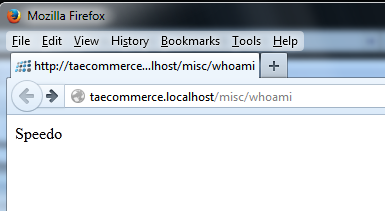
Who am I?

By changing the build configuration, I am able to change my workspace to the corresponding brand.


This is achieved by a MS Build trick.
  • The brand projects are not referenced anywhere (very important)
  • Therefore, when we build Debug, there will not be any brand specific dlls.
  • We used build configurations to trick MS Build to dump the brand dll to the web project for relevant brands.
  • Autofac reflection will pick up the brand dll if they exists, because of the way how Nop Dependency Register works.

Caution

  • Use clean solution in between the building of different brand environments (to delete any brand dlls).
  • Pay attention to the dlls in the Nop.Web bin folder. Occasionally the clean solution do not delete everything in the bin folder. Then we will need to manually clear this folder.
  • Always check Who am I to make sure you are working in the right brand.

Further Improvement

  • It is not so easy to deploy, as I need to build the project once per brand (so it will generate different dlls)
  • Unfortunately in practice, clean solution doesn't always work. For anyone who familiar with MS Build, we could create pre-build event to properly clean up the solutions (instead of relying on Visual Studio)
  • Combine MS Build with PowerShell, we can implement a way to "quick switch" dlls for different brands.

nopCommerce - Instantiation of ICacheManager. PerRequestCacheManager not MemoryCacheManager?

Once you started looking into performance, and especially for category page, we would generally looking to cache the result set or page. By coincident, me and my colleague ran into the same problem, so I thought this could be quite common.

Scenario

While trying to implement caching strategy for category page, I found my results and in particular, my FeaturedProducts of the CategoryModel are not being cached while running in debug mode.

As usual, I created my custom controller as follow.


In my controller method, I would check and use the cache if it is available.

Steps In

In debug mode, immediately after the object is written to the cache, the object is in the cache. However, it will ALWAYS return false, and I if I step into the code, the object indeed not in the cache.
This can easily be over-generalised as one of the following without paying closer attention as:-

  • Cache not working
  • Nop is slow
  • Performance Issue

Solution

If we look at what nop provides for ICacheManager, there are 2 CacheManagers (We will ignore the NopNullCache for now) that implement ICacheManager, they are MemoryCacheManager (nop_cache_static) and PerRequestCacheManager (nop_cache_per_request).


As the names suggest, MemoryCacheManager writes objects to memory cache; PerRequestCacheManager writes objects to the session on per request bases.


In Nop.Web\Infrastructure\DependencyRegistrar.cs,  we found the following piece of code.


Without specifying what to register for ICacheManager in IoC, I found by default the PerRequestCacheManager (nop_cache_per_request) is instantiated.

This is an incorrect behavior for my problem as I want to put the content in the memory cache and made available to multi requests over a period of time (until times out).

We need to tell IoC which type of CacheManager we want to instantiate for the interface by using the following code. This will hint IoC to inject a concrete class of MemoryCacheManager to my ICacheManager!!


nopCommerce - Customization for Model

Scope

Due to business requirements on the category page, I need to extend and introduce some new fields to the CategoryModel.


Implementation

The way how nopCommerce designed architecture is that the commonly used classes are hinted by the keyword partial. This allows developers to extend the class in the same assembly without much effort. I previously stated that this is not a clean solution and I preferred an alternate method by using IoC.

I cannot however use IoC in this scenarios.

Model instantiation are handled inside the controllers, in fact inside the methods of the controllers!! This prevented me from using dependency injection for model instantiation.

The models in nopCommerce are not inherited to any interface. Without polymorphism, it is difficult to extend objects.


Partial class didn't take me much effort to extend and fairly easy to use. The drawback is I am ending up with many loose files in the project. This is however a feasible solution.

Is this an Anti-Pattern?

Nop.Web is an MVC project that has the model, view and controllers inside. Views are meant to be dirty, as they are the UI. Thus, the project is meant to be and would be dirty.

The truth is if you are using nopCommerce as a platform for multi-tenant websites, there are some clever ways of doing this such as controller factory. It gives the controllers and models a separation from the project.


nopCommerce - Register route for admin controller

In nopCommerce, if you ever create a new or customize a controller in admin and getting 404 not found error? Read on...

With the approach of inheritance of customized controller, it is essential to register a new route for the new controller.

As a developer, it is natural to look at the RouteProvider.cs in the Admin project.


The original Nop Code looks like this which seems promising, but it doesn't do it.


The actual place to look at is hinted by the first image. The correct place to look at should be the Nop.Admin.AdminAreaRegistration.cs.


You can add your routes in here. In my example, it is registering a route for PictureController.


nopCommerce - Create New SQL Table / Domain Entity in the Cleanest Way

Scope

As our nopCommerce project advance through, finally it comes to a point where I need to create a new SQL table, a domain object to hold the properties and a service to perform CRUD (Create Read Update Delete) actions.

I am creating a Color class that will hold a SAP Color Code and Color Name. I need to create a service to lookup the Color Name by the Color Code. And this information needs to be available in the database.

Similar to my previous posts here and here, I am trying to do it the 100% clean way so my future upgrade path will be painless (by taking away the pain now). And I am not going to stress why this is important again. Different developers take different points of view in this topic and ideas could be extremely diverted.

Implementation

Domain Object

I create a new project follows the Nop.Core structure called TA.Core.


I create my domain class as usual. This one is straight forward.


Service Class

I need to create my color service that will utilize the domain object, I won't bother with the actual implementation but it looks something like this. It was fairly a Copy and Paste from Nop.Services.Catalog.ManufacturerService with Find and Replace job.


This class sits in my Custom Project, in my case, TA.Services.


Don't forget your dependency register, it sits inside the Service call, wherever you put the file in, you register in that project.


In my calling code, I will have to include this in my ctor. I am using the same example as my previous post, my TAImportManager.


SQL Table

We now need to create this SQL table ourselves. I call it dbo.color, but it is probably worth to prefix all the tables to group all the custom tables together, and avoid possible table name collision in future upgrades.

Mapping File

One of the file that is easily missed out in nopCommerce DAL area is this mapping file. If you forget this step, your code will compile but you will get runtime error when you try to access the object.

The entity type <type> is not part of the model for the current context.


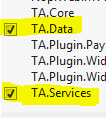
We will put the mapping file in a blink blink shiny new project and you may guessed right - TA.Data


In the mapping file, we tell EF which table to look up and any fields mapping etc. 

ObjectContext

NopObjectContext - This is the object context that basically does all the database operations. I wouldn't go too technical about this, but the only thing we need to do is to make sure it knows where to find our ColorMap. If you look at this file carefully, in the OnModelCreating(), this line of code is to register all the types within the assembly.

var typesToRegister = Assembly.GetExecutingAssembly().GetTypes()

Since our mapping is not inside the same assembly, we will create our custom NopObjectContext!!


DependencyRegister

We will register everything in the base by calling base method, then register everything in our custom assembly!!

Last but not least, we need to now register our TANopObjectContext in IoC.

We create a new DependencyRegistrar in TA.Data as follow. I copy and pasted the relevant sections from the Nop.Web project. Since we don't use http, I have changed the InstancePerHttpRequest() to InstancePerLifetimeScope().


Add reference

At this stage, if you build and run, you will still get error about entity not found.

The entity type <type> is not part of the model for the current context.

Didn't nop promise to register everything that implement the IDependencyRegistrar? Well, it might help if you tell it to. In the web project, we need to add reference to TA.Data.

Conclusion

As you can see, quite a big circle to do something very simple. The quickest and dirtiest approach would be adding files in the Nop.Data project, but if you are going to use nopCommerce intensively and with prospect of upgrading to future version, I rather take the pain away now.

In this exercise, I have touched no code / logics in the Nop Platforms. In my check-ins, the only thing I am checking into the Nop is Nop.Web.csproj (Added new references to the new projects) and NopCommerce.sln (Added new projects to the solution.

Fear not about passing your peer code review. :)