Pages - Menu

Showing posts with label Plugin. Show all posts

nopCommerce - Missing configure button in plugin

Scenario

I am building a new nopCommerce plugin that will handle the CyberSource Order Status Notification. Everything went smoothly and got all my code compiled. After the installation of the plugins, I found there is a missing configure button that would normally be there.


Solution

I revisited the source code of my other plugins, it compiles fine and didn't spot any obvious error. I went over to some of my notes and wiki then I found I missed a very little step.

public class CyberSourceOSNPlugin : BasePlugin, IMiscPlugin

I created the plugin class file but left out the bit where I have to implement an interface of IPlugin. After I implemented the interface, it is working fine again.


nopCommerce - Schedule Task Plugin

Scope

Recently having issues with the integration with our payment gateway provider. Occasionally our synchronize call to their server will not get a response back.

We are to write a schedule function to run regularly. It will pull out a list of pending orders and re-run the authorize and capture.

We are:-
  • using nopCommerce 3.3
  • utilizing the nopCommerce Schedule Task
  • using plugin approach

Technical Overview

We are to use the Nop.Services.Tasks.Task and ScheduleTaskService to create a Nop Schedule Task that runs periodically.

Implementation

Task

Firstly create a new plugin. In our plugin, we will create a MyTask class that implements ITask.


The only method in the interface is Execute(). This is the place where we will put our calling codes. In this example, I am calling my own method QueryPendingOrders().

IoC

In my example, I am using a new service class, so I will need to register the service class via IoC in our plugin. A new DependencyRegistrar class will do the trick.


Install Schedule Task

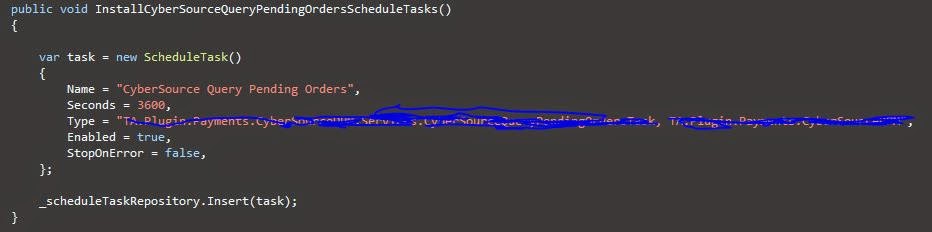
Next, we need to create a schedule task for the task. This can be done by 
the overrides of Nop.Core.Plugins.BasePlugin, In the Install() of my plugin, we will call the following.


Calling Method

For the purpose of demonstration, I am just writing to the log.


Schedule

After installing the plugin, a new schedule task is created as follow. (I have changed the run period to 60 seconds for demo)


Log

Let it run for a few minutes and check the log. It seems quite spot on that it is called every 60 seconds.


Conclusion

There was not much work involved to create a schedule task. All the magic are already done and made available for us from the nopCommerce.

During development, I noticed the TaskManager utilize singleton pattern. It is then responsible to instantiate the instances for the TaskThread. The task threads will run continuously and kick off the Execute() periodically. 

One thing I wanted to do is to compare the performance between Nop Schedule Task vs SQL Server Agent Job. I have a feeling that the sql job may run a little faster as the nop task thread is not a push notification, but simply a continuous running thread.


nopCommerce Discount Rules Plugin - Exclude Sale Products

Scope

Create a discount rule plugin that when a user create a discount, they have the option to add requirement whether to include sale products to the discount or not.

We are currently on the latest nopCommerce 3.3 platform, as of today.

How it works

I went through the source code of how other DiscountRules plugin works and concluded the followings:
  • The relationship between Discount and DiscountRequirement is just a one-to-many FK relationship. One Discount have many DiscountRequirements.
  • Any properties such as which customer role is required, or how much dollar value to pass the requirement rule is stored in setting.
  • The setting key is defined within the plugin and transparent from the calling controller / services.
  • In XxxDiscountRequirementRule.cs, we define CheckRequirement() that will return true / false if the requirement is fulfilled. It reads the relevant settings to check the properties such as dollar value or customer roles for passing the discount rule. 
  • The rule file must implement the IDiscountRequirementRule interface.
  • The pattern for how the settings are stored are generally in this format. string.Format("DiscountRequirement.xxx-{0}", discountRequirement.Id)
  • There is an ajax call in the view that does a post back to the XxxController.Configure when saving the DiscountRequirement. 

Steps

Create the project

Following my previous post How to write a nopCommerce plugin I have created a new project called DiscountRules.SaleProduct from other DiscountRules plugin.

Model

I added a boolean property in the RequirementModel to indicate if we want to include sale products.

public bool IncludeSales { get; set; }

View

The project I copied from were using DropDownList, I changed to CheckBox and modified the Ajax call that post back the property to the controller. Make sure to follow the pattern on suffixing the requirement id to the setting, as the screen can have multiple instance of the same rule.


Change the controller name in the ajax post back to match the new plugin name.

Controller

Modified the Configure method to work with the Ajax post back call. Make sure the parameter names match.

XxxDiscountRequirementRule.cs

This CheckRequirement() method is the magic method that we will put our logics in checking sale items in the cart or not, and we will return true / false accordingly to exclude sale products from discount. Hopefully the customers still happy...

Depending on your implementations, the code might look like something below and could be very simple.
public bool CheckRequirement(CheckDiscountRequirementRequest request)
{
    ...

    foreach (var product in cart)
    {
        if (product.SpecialPrice.GetValueOrDefault() > 0
            && product.SpecialPriceStartDateTimeUtc < DateTime.Now
            && product.SpecialPriceEndDateTimeUtc > DateTime.Now)
            return false;
    }

    return true;
}


Troubleshooting

While in debug mode developing the plugin, if you found the plugin not reset properly even after you rebuild the solutions or clear cache. You could try to clear the Temporary ASP.NET Files folder. If you get access denied because it is being used, try delete the w3wp.exe from task manager. That will stop the IIS from accessing it.

nopCommerce Plugin - Occasional "Temporary ASP.NET Files" Error


During the development of nopCommerce plugin, I am getting this not so useful null reference error. If you look careful enough though, this not so useful error did give me some hints though.

NullReferenceException: Object reference not set to an instance of an object.]
   ASP.<>c__DisplayClass1.<GenerateSubCategories>b__0(TextWriter __razor_helper_writer) in c:\Windows\Microsoft.NET\Framework64\v4.0.30319\Temporary ASP.NET Files\root\683926bd\eece36df\App_Web_ta.plugin.widgets.megamenu.views.widgetsmegamenu.megamenu.cshtml.4107764b.if7iazw3.0.cs:0

It is complaining about an object not found in the temporary folder. Occasionally the temporary folder is outdated and Visual Studio is not able to clear during recompilation. I manually deleted the temporary folder, recompile and everything work fine again.

nopCommerce Customization with Controller Inheritance

Scope


The following article is based on the latest platform of nopCommerce as of today, version 3.1.

Scenario


Trying to customize the view by adding some extra custom text, the goal is ideally we will not change the existing controller in the nopCommerce platform to allow easier future upgrade.

Normally, we will create a widget plugin to do that, nice and neat that plugin is isolated from the page controller and allow easy plug and play. This would work fine for most people.

However, in certain scenarios, if the works required to be done in the controller is more complicated like introducing new services, security control etc, then we will need to modify the controller.

The gotcha is we don't want to change the existing controller for future upgrade, with IoC and OO architecture, one would think it is easy just to create a new controller to inherit from the existing controller for custom works, but life is not that easy.

Customization


CoreController

In CustomerController, we need to set the Register() as virtual. And that is only change required in our core controller, so that you can override its functionalities.

VirtualRegister


CustomController

Let's take CustomerController as an example and I want to override the Register().

I created my own CustomerController file inside a folder called Custom.

 CustomerController in Explorer

I gave it a namespace of Nop.Web.Controllers.Custom, and inherit from the Nop.Web.Controllers.CustomController.

controller

You will need to set your constructor same as the parent controller, and use the keyword base to inherit from the base controller, pretty standard C# inheritance syntax.

constructor

You may override the Register() like the following. In this example, we changed the value of the ViewBag.Title only, but as you can imagine, you can initialize new objects or call other services, all be achieved.

OverrideRegister

RouteProvider

RouteProvider

In the Nop.Web project, Infrastructure\RouteProvider.cs, we need to map the controller to a different namespace, so our custom controller will be used in place of the parent one.

RouteProvider Custom

View

For demonstration purpose, I updated the view as follow, but a more professional way by using theme can be found here.

view

Result

Compile the solution and head to register page, it should look like this.

result


IoC

What about IoC? How will the CustomController get instantiated? That is already handled by the Nop.Web.Framework.DependencyRegistrar that will register all controllers in the assembly.

Conclusion


As demonstrated, it is not horribly difficult to do customizations in nopCommerce, I only wish it could be easier with the RouteProvider part where I can instead just use the IoC to change the constructor only, then the Visual Studio would be smart enough to pick up the custom controller during compilation.

nopCommerce Plugin - The partial view was not found

In an attempt of creating a new plugin, we have the following standard nopCommerce views and a "shared" view.

solutionexplorer

When dealing with view, I ran into an error like below where it cannot find the view for the plugin.

viewerror

In visual studio, view created by default with Build Action set to Content. This needs to be changed to Embedded Resource.

viewresource

The partial view also needed to be referenced by giving the fully qualified name space in the calling view.

FQ

How to write a nopCommerce plugin - Hello World

Scope

This is an article to discuss and may resolve the "does not implement IController" error. It gives a walk thru on how to write a NopCommerce plugin with the NopCommerce 3.1 framework.

Introduction

If you are new to NopCommerce and about to write a NopCommerce plugin, the likelihood is that you might have read this article already.

If you are then lucky enough to get the infamous "does not implement IController" error, with a bit of google, you would have landed and read this article.

1

If you are then still having the same error, unable to resolve the problem even followed all the suggested solutions by others like "pad a space to global.asax" etc, then the rest of the article is for you.

Project Setup

In this example, it is a quick walk thru on how to build  a not so simple Hello World widget plugin.

If you read the above how-to article, they suggested you to start a new class library project, but I found copying an existing project will save you from the mysterious "does not implement IController" error.

To begin, I made a copy of the Nop.Plugin.Widgets.NivoSlider plugin that is part of the framework and gave it a new name.

Things that I then need to modify are as follow:-

Project Properties

Change the output path and file name.

2

3

Properties\AssemblyInfo.cs

Fairly straight forward. And for the sake of completeness, I generated a new guid and replaced the one I copied (although I am not going to expose the dll to COM)

References folder

The good thing about copying an existing project is I can leave this untouched.

Description.txt

Fairly straight forward.

HelloWorldPlugin.cs

We will return "hello_world" in the GetWidgetZones(). This name will match the widget in the view that use this plugin later on, so the widget will be rendered in the desired place. The rest is pretty self explained from the comments.

widgetzone

HelloWorldSettings.cs


We will have 2 fields, to store greeting and name.

code

Controller

Following the same naming convention, we will call it WidgetsHelloWorldController.

In the constructor, we only need ISettingService, IStoreContext, IStoreService, IWorkContext.

controller constructor


The 3 main actions in this controller are Configure(), Configure(configurationModel) and PublicInfo(widgetZone).

Configure is for the configuration page in the admin; PublicInfo is the actual rendering of the plugin in the front end.

Fairly similar to the NivoSlider code so I won't go into details.

Configure

Configure(Model)

PublicInfo

Models

Similarly,

ConfModel

PubModel


Make sure the namespace is correct or it will throw runtime error.

Views

The Configure.cshtml view is quite a straight forward exercise of find and replace / code chopping.

The PublicInfo.cshtml view will display the message.

publicview

Hello World

We are now nearly there to greet the world.

Admin

Go thru the process and install the plugin, then enable it.

install

Click on the configure button and depends on your multi-store setup, you might get this.

admin conf


Values can be stored site-wide or store specific, I will leave the fun parts for you to explore.

Front End

For demonstration purpose, we need to inject this widget / plugin into an view so it can be rendered in the front end. In this example, I picked the cart.cshtml view, you can find this in the Views\ShoppingCart as part of the NopCommerce platform.

We will add a line to indicate where we want the widget to go in the view.

cart


And it should look like this.

hi

Conclusion

The way how plugins are created were not so developer-friendly. It takes a lot of copy and paste works and some of the error messages are not so friendly neither. Nevertheless, it is a nice platform that allow you plug and play different plugins, install / uninstall / enable / disable. The multi-store ability with the plugin greatly helped reduce development times where in some platforms you maybe hacking your way until you can't hack further. I am looking forward to see what NopCommerce will evolve into in the future.