Pages - Menu

Showing posts with label Customization. Show all posts

nopCommerce - AWS Migration

Scope

We are moving our existing websites to AWS EC2. From a high level perspective, our plan as follow.
  • Move the websites to EC2
  • Move the database to RDS
  • Content Images upload via CMS will go to s3
  • Product Images on the websites are moved to s3
  • Move the console apps to a t2.micro instance
We are using nopCommerce 3.3.

Implementation

Websites and Console Apps

Moving sites and apps to cloud instances are pretty straight forward. There are no code changes required in nopCommerce.

Database

We used the SQL Database Migration Wizard tool, pretty straight forward.

S3

Migration to S3 required some code changes, but we are not getting much resistance because of the advantage of using OO and polymorphism.

Previously we already wrote a custom class that inherit from the PictureService.

public class TAPictureService : PictureService, ITAPictureService, IPictureService

Now, I can inherit my custom class by my new AWS class.

public class AwsPictureService : TAPictureService, ITAPictureService, IPictureService

We will then override the image read / write method to connect to AWS. This was mentioned previously in my other post Amazon SDK S3 with .Net

In our DependencyRegister, we now register our new AWS Service.

builder.RegisterType<AwsPictureService>().As<IPictureService>();

Now my system is able to support either local or S3 images by changing the register type via DI.

nopCommerce - Instantiation of ICacheManager. PerRequestCacheManager not MemoryCacheManager?

Once you started looking into performance, and especially for category page, we would generally looking to cache the result set or page. By coincident, me and my colleague ran into the same problem, so I thought this could be quite common.

Scenario

While trying to implement caching strategy for category page, I found my results and in particular, my FeaturedProducts of the CategoryModel are not being cached while running in debug mode.

As usual, I created my custom controller as follow.


In my controller method, I would check and use the cache if it is available.

Steps In

In debug mode, immediately after the object is written to the cache, the object is in the cache. However, it will ALWAYS return false, and I if I step into the code, the object indeed not in the cache.
This can easily be over-generalised as one of the following without paying closer attention as:-

  • Cache not working
  • Nop is slow
  • Performance Issue

Solution

If we look at what nop provides for ICacheManager, there are 2 CacheManagers (We will ignore the NopNullCache for now) that implement ICacheManager, they are MemoryCacheManager (nop_cache_static) and PerRequestCacheManager (nop_cache_per_request).


As the names suggest, MemoryCacheManager writes objects to memory cache; PerRequestCacheManager writes objects to the session on per request bases.


In Nop.Web\Infrastructure\DependencyRegistrar.cs,  we found the following piece of code.


Without specifying what to register for ICacheManager in IoC, I found by default the PerRequestCacheManager (nop_cache_per_request) is instantiated.

This is an incorrect behavior for my problem as I want to put the content in the memory cache and made available to multi requests over a period of time (until times out).

We need to tell IoC which type of CacheManager we want to instantiate for the interface by using the following code. This will hint IoC to inject a concrete class of MemoryCacheManager to my ICacheManager!!


nopCommerce - Register route for SEO Friendly Url Redirect

Scope

This document is scoped to nopCommerce 3.1. The latest version as of 2 months ago, now the latest stable nopCommerce is up to 3.2 as of today.

My goal today, is to add custom logics in the CatalogController, so that all SEO Friendly Url (generic path) will go to my custom controller not the default controller. Previously, I documented here on how I create custom controller. It is similar to what I have done before, but generic path are handled differently in nopCommerce.

Route

As documented in the official FAQ, we know how to register route for normal pages. For admin pages, I got that covered here. Today, we are going to look at how SEO Friendly pages work. 

SEO Friendly pages are the ones that does not follow the standard MVC url pattern.

In summary, there are 3 types of routes in nopCommerce.

http://mydomain/checkout/completed/
It is a normal page. It reference to the Checkout Controller and the Completed Action.

http://mydomain/Admin/setting/Catalog
It is an admin page. It is referencing to the Setting Controller and the Catalog Action from the admin area.

http://mydomain/women-s-logo-stretch-full-zip-hoodie
It is a SEO page. It is handled by a special route provider called GenericUrlRouteProvider. The string "women-s-logo-stretch-full-zip-hoodie" is called a SEO slug, usually referenced by the SeName property in some of the nopCommerce objects.

GenericUrlRouteProvider

GenericUrlRouteProvider is located in Nop.Web\Infrastructure.


By default, it has a priority set to -1000000, this is latest route by default, but of course you can override it. There are 2 type of methods are being called inside this file. MapGenericPathRoute and MapLocalizedRoute. In fact, they are not just different methods, but the methods are coming from different objects.

MapGenericPathRoute belongs to the object GenericPathRoute; and MapLocalizedRoute belongs to the object LocalizedRoute. And they have the following relationship.
public partial class GenericPathRoute : LocalizedRoute
public class LocalizedRoute : Route
There is also the following comment in this file by the core developer. This is a very important note and we will see in a minute.
//define this routes to use in UI views (in case if you want to customize some of them later)

GenericPathRoute 

As it is named, everything that are generic will get pass to this handler. All works are done inside this file. As in the source code, everything is hard coded.


This is a very important fact to know. The default behaviour of nopCommerce is not passing in any namespace, and the only way to change it is inside this piece of code.

This is located in the Nop.Web.Framework\Seo

In this example, I have added the following line, and now the .Net engine will look for the controller in the correct namespace.

data.DataTokens["Namespaces"] = new[] { "Nop.Web.Controllers.Custom" };

LocalizedRoute


LocalizedRoute handles the virtual path. It provides functionalities for the HTML helper to render any hyperlinks in the view (UI). Any changes here should be complimented by changes in GenericPathRoute.

This is located in the Nop.Web.Framework\Localization

Summary

MapGenericPathRoute would change the route provider behaviour such that when an seo-friendly url is requested, the right controller will be called in the system.

MapLocalizedRoute changes the way how the HTML helper would generate the url for links inside the view. Hence the comments from core team was saying "define this routes to use in UI views". 

nopCommerce - Customization for Model

Scope

Due to business requirements on the category page, I need to extend and introduce some new fields to the CategoryModel.


Implementation

The way how nopCommerce designed architecture is that the commonly used classes are hinted by the keyword partial. This allows developers to extend the class in the same assembly without much effort. I previously stated that this is not a clean solution and I preferred an alternate method by using IoC.

I cannot however use IoC in this scenarios.

Model instantiation are handled inside the controllers, in fact inside the methods of the controllers!! This prevented me from using dependency injection for model instantiation.

The models in nopCommerce are not inherited to any interface. Without polymorphism, it is difficult to extend objects.


Partial class didn't take me much effort to extend and fairly easy to use. The drawback is I am ending up with many loose files in the project. This is however a feasible solution.

Is this an Anti-Pattern?

Nop.Web is an MVC project that has the model, view and controllers inside. Views are meant to be dirty, as they are the UI. Thus, the project is meant to be and would be dirty.

The truth is if you are using nopCommerce as a platform for multi-tenant websites, there are some clever ways of doing this such as controller factory. It gives the controllers and models a separation from the project.


nopCommerce - Register route for admin controller

In nopCommerce, if you ever create a new or customize a controller in admin and getting 404 not found error? Read on...

With the approach of inheritance of customized controller, it is essential to register a new route for the new controller.

As a developer, it is natural to look at the RouteProvider.cs in the Admin project.


The original Nop Code looks like this which seems promising, but it doesn't do it.


The actual place to look at is hinted by the first image. The correct place to look at should be the Nop.Admin.AdminAreaRegistration.cs.


You can add your routes in here. In my example, it is registering a route for PictureController.


nopCommerce - Custom Service inherit from Core Service by Dependency Injection and new interface

Scope

Previously I was doing customization to override a method in custom class from core class. It provided the cleanest way to inherit from nopCommerce core services without any tampering to the core files. One thing that I couldn't do with the previous approach is to create new method or to overload a method. Today, we will go through this implementation.

Implementation

To begin with, we will create a new custom interface, and put the new methods (or overloading methods) that we need. The custom interface will inherit from the core interface.


The Custom class will implement the core class and inherit from the custom interface instead of the usual core interface. This part is quite crucial as we will see in a minute. Don't forget your usual ctor.


From my calling class (in this example, I am using a custom class of the ImportManager), instead of the usual property assignment, we will need to cast the concrete class to the custom interface, so it can be assigned to the private / protected property.


In IoC, we will need to register the custom class for the core interface!!


Wait a minute, how does it work? Shouldn't I register as custom interface? If you do, you will get an error, when there are other core classes that are still using the core interface with the private property still referencing the core interface. Something like a ctor doesn't match up exception.

The fact that custom class implement custom interface but custom interface also inherit from core interface, we created this chain in polymorphism that if I am a type of RacingCar, then I must be a type of Car. That's why the explicit cast in  _productService = (TAProductService) productService; would work.

Build the solution and run the code, my new method is being called.


Conclusion

As you can see, this is not very difficult but a little tricky when we are dealing with IoC and MVC at the same time. As demonstrated, it only required a little code to do the work.

Talking about racing cars, who went to the 2013 Sydney 500 Super Car last week?


nopCommerce - Create Customized Service that inherit from Core Service by Dependency Injection

Scope

Provide the cleanest way to inherit from nopCommerce core services without any tampering to the core files.

In this exercise, the Nop.Services project is 100% untouched. Why is it so important? It benefits in many different ways but mostly for the reason of keeping the code neat and manageable. A nice and clear separation between custom code and core code.

This is written base on nopCommerce 3.1, the latest version as of today it is written.

Business Requirements


  • Discount should be calculated based on RRP (Product.Price), not the SpecialPrice or TierPrice. 
  • PriceCalculationService.GetFinalPrice() should still return the cheapest price out of the following 3 conditions:-
    • Cheapest discount off RRP
    • Special Price
    • Tier Price (if eligible / available)

Setup

We setup the price for the "Cooking for Two" book as follow. RRP $19, and Speical $15.


 We then apply discount rule 50% to the category.


50% discount applied to special price and now selling for $7.5. This is the default behavior of nopCommerce out of the box.


Implementation

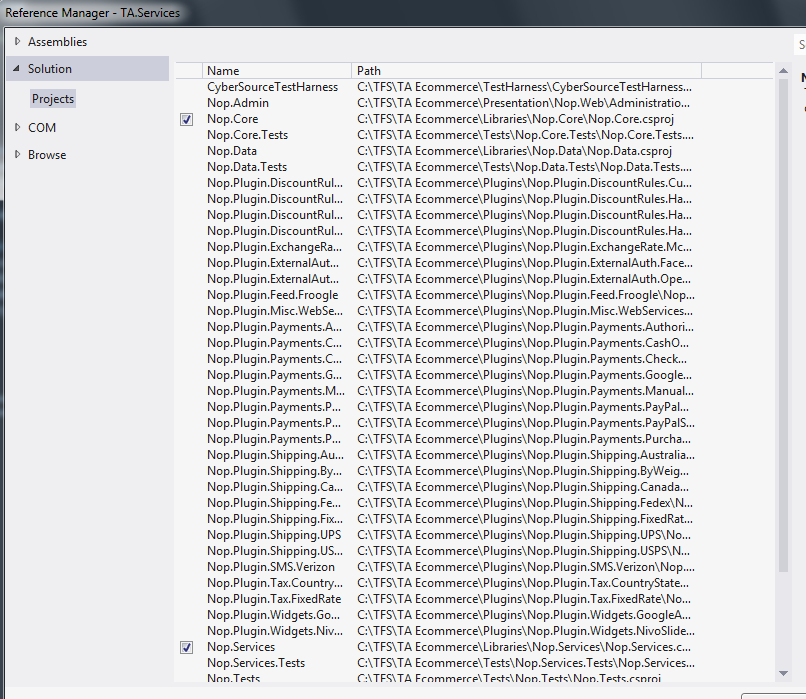
I created a new project and added to the solution called TA.Services. It follows the same folder structure as Nop.Services and I created a new class CustomPriceCalculationService.


In TA.Services, I added reference Nop.Core and Nop.Services.


Similarly, in Nop.Web.Framework, I need to add reference to TA.Services.

Under Nop.Web.Framework, I changed this magic line in DependencyRegistrar.cs.

[EDIT] In TA.Services, I create a new DependencyRegistrar that implements IDependencyRegistrar. I will register my service to the interface. What it does is now everywhere in the project that require IPriceCalculationService, the IoC will return a concrete class CustomPriceCalculationService instead of the old PriceCalculationService.


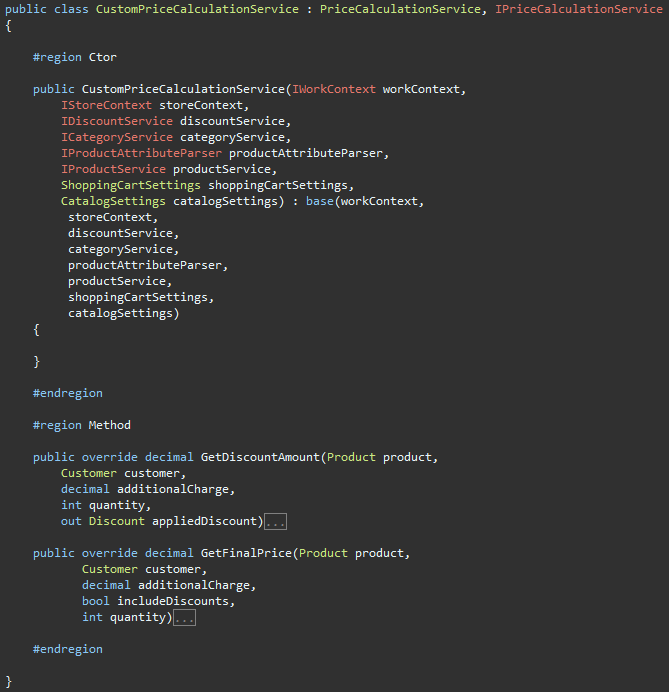
In CustomPriceCalculationService, I need to inherit PriceCalculationService and implement IPriceCalculationService. Some usual Ctor methods override.

For those who interested in the actual implementation, I only made small changes to GetDiscountAmount and GetFinalPrice.


Now we are selling for $9.5 (50% off from $19). Hopefully still a happy customer!!


Conclusion

There are maybe better ways to implement this than what I have done here. eg. Use the plugin approach and make the use of Special Price configurable in the admin etc, but I couldn't wait to try this 100% clean way of customizations. 

Now I have a complete control on how I like to plug and play this customizations in a multi-tenant environment, or I can put more custom inheritance on top of already custom inheritance. The only thing I need to change is the DI which is pretty much given. 

As you can see, customization on services is a lot easier than controllers. Note how much troubles I had with the nopCommerce Customization with Controller Inheritance.

nopCommerce Customization with Controller Inheritance

Scope


The following article is based on the latest platform of nopCommerce as of today, version 3.1.

Scenario


Trying to customize the view by adding some extra custom text, the goal is ideally we will not change the existing controller in the nopCommerce platform to allow easier future upgrade.

Normally, we will create a widget plugin to do that, nice and neat that plugin is isolated from the page controller and allow easy plug and play. This would work fine for most people.

However, in certain scenarios, if the works required to be done in the controller is more complicated like introducing new services, security control etc, then we will need to modify the controller.

The gotcha is we don't want to change the existing controller for future upgrade, with IoC and OO architecture, one would think it is easy just to create a new controller to inherit from the existing controller for custom works, but life is not that easy.

Customization


CoreController

In CustomerController, we need to set the Register() as virtual. And that is only change required in our core controller, so that you can override its functionalities.

VirtualRegister


CustomController

Let's take CustomerController as an example and I want to override the Register().

I created my own CustomerController file inside a folder called Custom.

 CustomerController in Explorer

I gave it a namespace of Nop.Web.Controllers.Custom, and inherit from the Nop.Web.Controllers.CustomController.

controller

You will need to set your constructor same as the parent controller, and use the keyword base to inherit from the base controller, pretty standard C# inheritance syntax.

constructor

You may override the Register() like the following. In this example, we changed the value of the ViewBag.Title only, but as you can imagine, you can initialize new objects or call other services, all be achieved.

OverrideRegister

RouteProvider

RouteProvider

In the Nop.Web project, Infrastructure\RouteProvider.cs, we need to map the controller to a different namespace, so our custom controller will be used in place of the parent one.

RouteProvider Custom

View

For demonstration purpose, I updated the view as follow, but a more professional way by using theme can be found here.

view

Result

Compile the solution and head to register page, it should look like this.

result


IoC

What about IoC? How will the CustomController get instantiated? That is already handled by the Nop.Web.Framework.DependencyRegistrar that will register all controllers in the assembly.

Conclusion


As demonstrated, it is not horribly difficult to do customizations in nopCommerce, I only wish it could be easier with the RouteProvider part where I can instead just use the IoC to change the constructor only, then the Visual Studio would be smart enough to pick up the custom controller during compilation.