Pages - Menu

Showing posts with label C#. Show all posts

How to remove all namespaces from XML with C#?

Scope

How to remove all namespaces from XML with C# is a commonly found questions in developments. It is not the best practice to remove the namespace and I see it as an anti-pattern to remove it rather than utilizing it, but there are cases that this can be an 'acceptable' solution.

One of the example could be this - Converting a DTD / XSD to strongly typed C# class

In this scenario, I was working with multiple servers that their returning namespaces are different each time, and the serializer fail to validate the namespace. Given the return xml is only so short lived and it was not worth the effort to implement multiple or dynamic namespaces.

Solutions

After looking up the stackoverflow, I was a little surprise that the first few answers seem to have issues with attributes being remove. They did not seem to serve the purpose of what they were asking - A clean, elegant and smart solution to remove namespacees from all XML elements.

Since no working solutions are available to me, I had an attempt to write my own as follow.

public static XElement RemoveAllNamespaces(this XElement element)
{
    return new XElement(element.Name.LocalName,
        element.HasAttributes ? element.Attributes().Select(a => new XAttribute(a.Name.LocalName, a.Value)) : null,
        element.HasElements ? element.Elements().Select(e => RemoveAllNamespaces(e)) : null,
        element.Value);
}

And I have tested the code with the following XML that have multiple level of nodes and attributes.


The 4 liner solution all serve it's purpose.

  1. Firstly, it creates the root node
  2. Appends all attributes
  3. Append all elements 
  4. Lastly, the value


The trick is in line 3, where it picks all the elements() and pushed back to it's own function from the current element. Thus, recursively doing the same thing for all the nodes.

The magic for it to work is the elegant way of how the XElement constructor works. I often found using XElement will end up with a 1 liner solution because of it's constructor, so a good coding style and line breaks will really help the next person who read your code.

Did my solution look clean, elegant and smart to you? Share your thoughts :)

Converting a DTD / XSD to strongly typed C# class

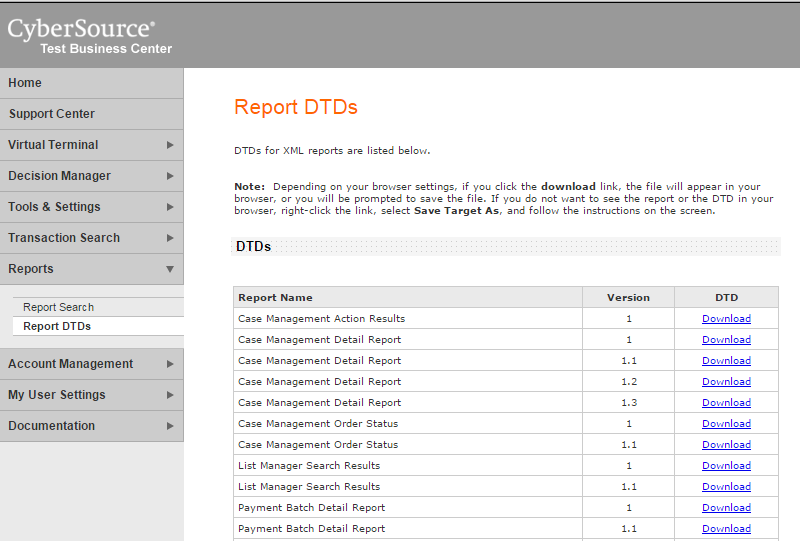
We are looking to implement some CyberSource Reporting functions that our system will be able to poll CyberSource for various reports, and call different actions base on the result. After going through the documentations, we know the CyberSource portals are providing us the DTD definitions.

Prerequisite

Implementation

Firstly we will need to download the DTD from the CyberSource portal.


We want to generate the strongly typed model class from the DTD definition, but we will need to convert this into XSD first. This can be done the XML Create Schema function via Visual Studio.


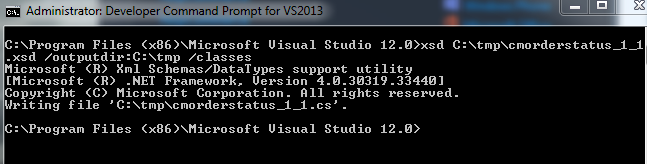
We are now able to generate the C# class by using the XSD.exe. It is available via the Visual Studio Developer Command Prompt.


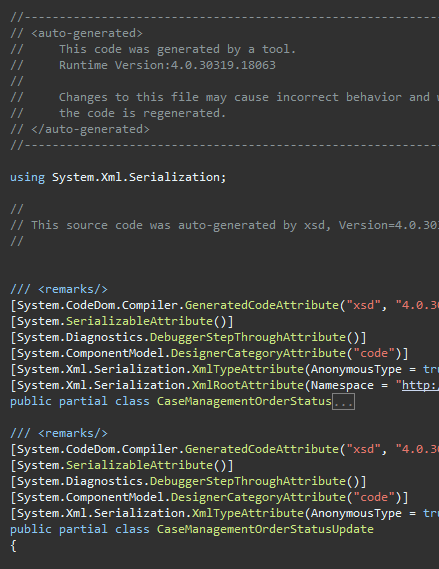
The generated file will look something like this.


Troubleshooting

[System.InvalidOperationException]: {"<xxx xmlns='some_uri'> was not expected."}

During developments, we got an exception of "There is an error in XML document (0, 0)." and the inner exception is "<Report xmlns='https://ebctest.cybersource.com/ebctest/reports/dtd/cdr.dtd'> was not expected."

This is due to the DTD that we downloaded had a namespace of vendor's live site, therefore our strongly typed class has a name space of the live URI too. However when we are connected to their sandbox, throws an exception as the namespace didn't match.

One approach would be dynamically changing the namespace according to our connections, but I chose an easier way.

Firstly, I removed the namespace from the System.Xml.Serialization Xml Attributes in our generated strongly typed object class.


We will also need to remove the namespace from the incoming xml before we do any deserialization. This can be achieved by creating an extension method to recursively remove all namespaces from all nodes.
private ConversionDetailReport GetConversionDetailReport(string xmlString)
{
    var serializer = new XmlSerializer(typeof(ConversionDetailReport));

    var xDoc = XDocument.Parse(xmlString);

    var xr = xDoc.Root.RemoveAllNamespaces().CreateReader();

    return (ConversionDetailReport)serializer.Deserialize(xr);
}

Amazon SDK S3 with .Net

Scope

We decided to move our images on our websites from local drive to Amazon S3. This includes all our product images from the e-commerce side; as well as any images or videos that are associated to the CMS side.

Setup and Installation

AWS Toolkit for Visual Studio

  1. Follow the Amazon Setup Guide to install the AWS Toolkit. 
  2. Download and install (or NuGet) AWS SDK for .Net.
  3. Configuring AWS Credentials
  4. Use the Amazon Endpoint List to configure the end point
  5. The Amazon SDK API documentation is pretty easy to read.

Code

Upload an object

By using the Amazon SDK, We change our file service to put files to S3 instead of saving to local folder. It divides into 2 parts. We will prepare the PutObjectRequest and call AmazonS3Client.PutObject() to upload the file.

public override HttpStatusCode UploadPicture(string targetPath, string sourcePath)
{
    // Create a PutObject request
    var request = new PutObjectRequest
    {
        BucketName = bucket,
        Key = targetPath.ToLower(),
        FilePath = sourcePath,
        CannedACL = S3CannedACL.PublicRead
    };

    try
    {
        using (var client = new AmazonS3Client(Amazon.RegionEndpoint.APSoutheast2))
        {
            // Put object
            PutObjectResponse response = client.PutObject(request);

            return response.HttpStatusCode;
        }
    }
    catch (Exception ex)
    {
        // logging and exception handling....
    }

    return HttpStatusCode.NotFound;
}

S3CannedACL is a predefined Access Control List that allows access to be set on S3 objects.

Access an object

To access an object in s3 is much easier. You will just need to know the url and have the correct ACL setup.

The URL format is in a form of http://{mybucket}.s3.amazonaws.com/{mykey} 

mybucket is the bucket name and mykey is the key (file path) to the object.


C# .Net Cannot close stream until all bytes are written.

Scenario

We are dealing with the Stream class in .Net and run into an inner exception of "Cannot close stream until all bytes are written."

Code

try
{
    using (var ms = new MemoryStream())
    {
        xElement.Save(ms);

        // Create a PutObject request
        var request = new PutObjectRequest
        {
            BucketName = bucket,
            Key = key,
            InputStream = ms
        };

        // Call S3 ....
    }
}
catch (Exception ex)
{
    _logger.Error(ex.Message, ex);
    throw ex;
}

By using the keyword using, we are expecting .Net will handle the close connection for us.

Rather than unable to close the stream, it was actually a problem where the position of the MemoryStream was at the end after the XElement.Save(). We need to manually reset the position of the stream to zero, so that it can be written to the PutObjectRequest object.

xElement.Save(ms);
ms.Position = 0;


Using Message Queue with nopCommerce

Introduction

We have a few issues in our IPC process that some of our IPC calls are dropped out. I am looking for a more robust way to handle the calls. One thing I am looking at is the Microsoft Message Queue.

Installing

In Windows 8, MSMQ is part of the Windows Features. Installing is fairly straight forward.


Setup

By using the Management Console, I have created a new private queue called Test.


We will give IIS_IUSRS permissions to access the queue.


nopCommerce

I have skipped some of the steps on about extending the class. They were previously discussed in nopCommerce - Custom Service inherit from Core Service by Dependency Injection and new interface.

MessageQueueService

We will create a very simple class to handle MessageQueue operations. I would recommend something more robust and reliable for real life application.

using System.Messaging;

public interface IMessageQueueService
{
    void SendQueue(QueuedEmail queuedEmail);
}

public class MessageQueueService : IMessageQueueService
{
    public override void SendQueue(QueuedEmail queuedEmail)
    {
        if (queuedEmail == null)
            throw new ArgumentNullException("queuedEmail");

        using (MessageQueue messageQueue = new MessageQueue(@".\private$\Test"))
        {
            using (var transaction = new MessageQueueTransaction())
            {
                transaction.Begin();

                messageQueue.Send(queuedEmail, queuedEmail.Subject, transaction);

                transaction.Commit();
            }
        }
    }
}

DependencyRegistrar.cs


builder.RegisterType<MessageQueueService>().As<IMessageQueueService>();

WorkflowMessageService.cs


To use MessageQueue when sending out emails, we will need to extend the WorkflowMessageService class to consume our MessageQueueService. We need create a property for IoC, change our ctor, and override the SendNotification Method.

// Properties
protected readonly IMessageQueueService _messageQueueService;

Inside our ctor
_messageQueueService = messageQueueService;

In our override SendNotification(), we will call our queue service instead
// _queuedEmailService.InsertQueuedEmail(email);
_messageQueueService.SendQueue(email);

Queue

Do something on the site that will trigger an email. If everything is setup correctly, you should see a message added to the queue.


Conclusion

Although we have only done it for emails, but we can easily use it for any IPC calls. The sky is the limit.

By using a mean of MSMQ as a middle layer, we decouple our system from 3rd party integration points. Thus, conform with the ultimate rule of loose couple and high cohesion in OO design.

This concludes the most basic setup for using MSMQ in nopCommerce. The next part is for our 3rd party system to read from the queue - which is their problem :)

nopCommerce - Multi Tenancy - Round 3

Multi Tenancy in nopCommerce by itself seems like an on going project for me now. Previously, I talked about how I was able to create brand specific dll in one share code base. (No splitting / branching in Source Control, one code base only). I used MS Build to separate the dlls during compilation which is neat but clumsy, as most developers would overlook these places. These can be found in here.

http://tech.sunnyw.net/2014/07/nopcommerce-multi-tenancy-2.html
http://tech.sunnyw.net/2014/05/nopcommerce-multi-tenancy.html

Scope

Previously I mentioned,
nopCommerce uses App_Data\Settings.txt to store database connection string... it became a hassle to swap connection string for local development as web config transformation does not help...
The problem arise not only with development environment that I have to constantly swap connection string, but in the event of multi tenancy with same code base and separated database, the code needs to connect to the correct database automatically.

Also, this cannot be simply done by a plugin or a check of store id in nop, as we would need to connect to the right database to get the store context.

Last but not least. This article is base on nopCommerce 3.3.

Objective

  • During developments, the correct database will be picked for multiple bindings without changing Settings.txt.
  • During deployment, the correct connection string applied to the websites without manually changing the Settings.txt in production environment.
  • Conform with the nopCommerce coding standard, so we are making the least changes. Best coding practice comes after this.

Setup

For our development environment, we will add multiple domain bindings to one website.

Note we only need to bind once for all https traffic. Https binding always work on IP base not domain base, as domain information is stored in HTTP Header that is encrypted as part of the https protocol.


Although nopCommerce doesn't have multi-tenancy supported out of the box, but its multi-store functionality will help assign different stores base on the url. I have previously demonstrated that.

Note that we would not do multi binding for live environment as we still want to have separate app pool for different websites for now,

Code

Settings.txt


We need to create a bunch of Settings_{site}.txt, one for each site.

Settings_site1.txt
Settings_site2.txt
...

We will have different connection strings in each Settings.txt files.

DataSettingsManager.cs


Ideally I would like to extend this class and override the method in my own class. Unfortunately, this class does not implement any interface and no IoC involved. Plus, some vendor plugins also hard-coded the way how to instantiate this object, usually find in plugins that create their own ObjectContext.

In the LoadSettings and SaveSettings method, we will change the way how filename is picked by default to our private function.

filePath = Path.Combine(MapPath("~/App_Data/"), GetSettingFileName());

private string GetSettingFileName()
{
    var dbSettingName =  ConfigurationManager.AppSettings["DBSettingName"];
    var filePath = Path.Combine(MapPath("~/App_Data/"), dbSettingName);
            
    if (File.Exists(filePath))
    {
        return dbSettingName;
    }

    return filename;
} 

Web.config Transformation


We added a new key in the web config.
<add key="DBSettingName" value="Settings_site1.txt" />

We also need to provide transformation for each build config.
<add key="DBSettingName" value="Settings_site2.txt" xdt:Transform="SetAttributes" xdt:Locator="Match(key)" />

Switch


To switch between sites during developments, we will use SlowCheetah to help transform our web.config. The correct connecting string will be picked via web config.


Conclusion

This is a step forward towards turning our sites to true multi-tenants environment. During development, I am now able to connect to the corresponding database just by transforming the webconfig.

In the future, I am hoping a particular store will always connect to its own db even if I bind multiple sites to only one set of dlls (one IIS website). Then I will be able to scale out the websites and provide high availability.
  • Brand specific dependencies need to be removed from web.config to another persistent storage. Maybe a share database or some sort.
  • Need to change how DataSettingsManager is instantiated. It needs to be done via IoC so it can be extended.
  • Find a balanced approach for scalibility.

C# - Convert string to alphanumeric only

Task

Today I have a task to strip off characters from a string that are not alphabets or numbers. I implemented it as extension method so that it is reusable.

Code

public static string ToAlphaNumericString(this string inString)
{
    if (string.IsNullOrEmpty(inString))
        return string.Empty;

    return new string(inString.Where(c => char.IsLetterOrDigit(c)).ToArray());
}

With linq, the code is short and simple. There are 2 interesting points in this.

char.IsLetterOrDigit()


One of the magic part of our magic line is the char.IsLetterOrDigit(). It checks if a character is letter or digit, then it will return as part of the list via linq.

ToArray()


The Where clause from linq returns IEnumerable. Normally we use ToList() to write the result to the memory for later use. However, because string is an array of chars in C#, we try to convert the linq result to an array, we then pass char[] to the constructor of string to instantiate a new object.


Thoughts

You probably already noticed by now. What I have done was checking up the characters one by one and instantiate a new string object with the characters. This has a potential performance issue as create an object is an expensive operation, at least for the purpose of stripping illegal characters. I have not done my benchmark yet, but I think StringBuilder will be faster.

EDIT: It turns out Linq is actually pretty good in performance according to some benchmarks.
Ref: http://stackoverflow.com/questions/11395775/clean-the-string-is-there-any-better-way-of-doing-it/11396039#11396039

nopCommerce - Multi Tenancy - Round 2

Multi Tenancy in nopCommerce by itself seems like an on going project for me now. Previously (http://tech.sunnyw.net/2014/05/nopcommerce-multi-tenancy.html), I blogged about how I was able to create brand specific dll in one share code base. (No splitting / branching in Source Control, one code base only). I used MS Build to separate the dlls during compilation which is neat but clumsy, as most developers would overlook these places.

Scope

As previously suggested,
It is not so easy to deploy, as I need to build the project once per brand (so it will generate different dlls)
This technique rely on the developers to build a different BrandedService.dll that the IoC will pick up via IDependencyRegistrar. This gives different brands a slightly different set of dlls as it was hard to maintain.

At the end of this session, we want to achieve,
  • Only build once and use the same set of dlls across all brands.
  • Easy for the developers to deploy.

Code

  • We store a unique id "BrandId" in our Web.config, and of course we will utilize web config transformation for this matter.
  • In the DependencyRegistrar for each brand project, we only register the classes if the brand id matches.
  • IoC will register different concrete classes during reflection (as usual).
  • Brands without matching ids simply will have the register logic skipped (although the IoC will still run the through the class because they all implement the IDependencyRegister.
As demonstrated in code, this is the DependencyRegister for TNF.Services and Speedo.Services.


A snapshot of the bin folder shows the dlls are exactly the same for different tenants.


There will be a redundant TNF dlls in Speedo project and vice versa, but my time is more valuable than a few kb dll, so I think this is a better approach. Removal of redundant dlls will not break the site :)

Nop.Web

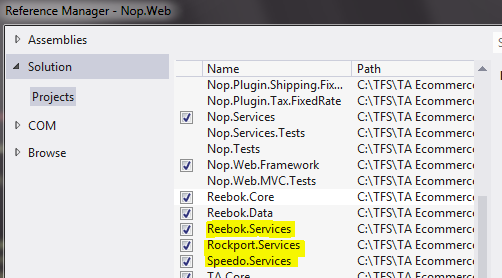
In our web project, we need to voluntarily register all our Brand.Services dll, this will force MSBuild to include all the dlls during build or publish.


Conclusion

Both of these approach have their pros and cons. I am sure there will be other ways doing this too. The key is the developers or the team must be comfortable with the process, and the people doing it are happy about it.

Further Improvement

nopCommerce uses App_Data\Settings.txt to store database connection string. This works fine for staging or live site as we just need to skip App_Data during deployment. However, it became a hassle to swap connection string for local development as web config transformation does not help in this situation. More into this topic next time.


HttpWebRequest Error. The underlying connection was closed: Could not establish trust relationship for the SSL/TLS secure channel.

Scope

In an attempt to use HttpWebRequest to make https call to our server, I got the error of

The underlying connection was closed: Could not establish trust relationship for the SSL/TLS secure channel.

Pretty self explained that it is complaining about SSL certificate or security issue or UTC clock offset etc. For my purpose, this is a local server that I am calling and I am not transferring sensitive data anyway, so I am not worrying about SSL security.


Solution

try
{
    ServicePointManager.ServerCertificateValidationCallback = new RemoteCertificateValidationCallback(delegate { return true; });

    var req = HttpWebRequest.Create(url);
    var res = req.GetResponse();

    using (var stream = res.GetResponseStream())
    {
        using (var sr = new StreamReader(stream))
        {
            return sr.ReadToEnd();
        }
    }
}
catch (Exception ex)
{
    Console.WriteLine("Exception caught: " + ex.Message);

    return string.Empty;
}


All it take is the first line of ServerCertificateValidationCallback delegate to return true, the rest is just standard HttpWebRequest call.

Xml Deserialization with Namespace Prefix in C#

Scope

  • To deserialize an xml from a 3rd party vendor into a strongly typed C# object.
  • The xml has a namespace attached.
  • No DTD or XSD were provided by vendor.

Steps

XML Schema Definition Tool (Xsd.exe)


Basically 2 command lines I executed:
  1. I first created the xsd file from a sample xml file that I have.
  2. Then I created the cs class file for the model by using the xsd scheme. 

Model

It is the best to generate model via Xsd tool because it contains a lot of System.Xml.Serialization Attribute that are needed for the serializer. Especially around the namespace area!! 

The class file will look something like this. A typical model class with lots of attribute hints.


Serializer

All the hard works were done for generating the model and xml attributes. That left this part a bit simple in comparison. It is a bit similar to Autofac, where the hard works are done at the entity level and the actual conversion is just 1 line of ToEntity().

The code looks like this. Some people managed to do this in 2 lines, but I found 4 lines look pretty neat for readability and my troubleshooting.


Troubleshoot


Unbounded Complex Type Bug

1 of the error that I ran into looks like this.

Unable to generate a temporary class (result=1). error CS0030: Cannot convert type

It is a confirmed Microsoft bug and won't be fixed.

The work around is to change the unbounded or add a dummy element for the complex type.


I added the element and regenerated the model class file, and the serializer is happy again.

Xsd generated incorrect schema

The xml schema reverse engineered by using xsd.exe from a sample xml file is slightly incorrect. It predicted I might have multiple child nodes, thus the class generated had all these unnecessary array declaration.

Looks like this.

   1: public MyComplexType Notes []


I would not blame the xsd tool but there are some manual works required to fix it. (Or C# code will end up with a lot of .FirstOrDefault()

XElement.Name.LocalName

As described before, there is a fallency of trying to access the element via XElement.Name. This method only works when there is no namespace. Out of curiosity and I read further that the correct way is to use XElement.Name.LocalName. I wouldn't recommend going down this path, but it is interesting to know that how we conventionally accessing an element name incorrectly (when you have namespace).

http://msdn.microsoft.com/en-us/library/system.xml.linq.xelement.name%28v=vs.110%29.aspx

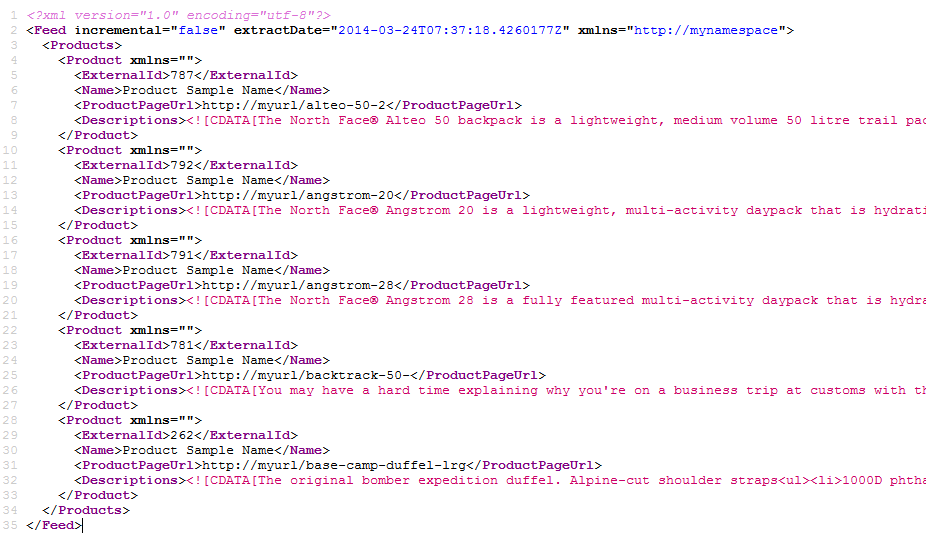
Return XML Datafeed in a MVC Action Result

Scope

We are trying to export our products in an xml feed. This will be provided to 3rd party vendor so they can provide search or product reviews for our products, or simply froogle.

I am building a MVC action that will return the XML result in the page when a url is called (so it should display the xml as content in the browser, and view source of the page should show the actual xml file).


Problem

During this exercise, I encountered the following errors:-
  • Error message about prefix '' cannot be redefined from '' tag
  • Missing XML Declaration
  • Getting a declaration of UTF-16 instead of UTF-8
  • '', hexadecimal value 0x03, is an invalid character
It is a multiple failure and apparently they are all common and valid errors.

Solutions


This "little" piece of code fixed quite a few things.

Name Space Prefix

Initially, I tried to put namespace in the XDocument as a XAttribute, that was causing error and the correct way is to add XDeclaration to the Element name.

Declaration

I intentionally put the declaration in string with the xml.ToString(), there were other solutions like using MemoryStream and Save() to "conserve" the declaration, I just found that is overkilling for such a simple thing.

This also resolve the issue where conversations of MemoryStream that caused UTF-8 became UTF-16.

Invalid Character 

This is because the object (string) that I pass in to the XElement has invalid character. There easiest way and most effective way is to Sanitize the input. I wrote an extension method for this.

CDATA

Another issue that might arise is the value for XElement might have HTML tags in it. Again, this can be done by another extension method to wrap the value in a CDATA object, the reason for the extension method is this will cater for null value and it looks neater.


nopCommerce - EF Configuration for SQL Composite Key

It is a common practice in the fashion industry that they have designer colors like crimson or scarlet for their fashion piece, but the majority of the consumers would only use common color name like red.

I build some custom SQL tables in nopCommerce by using Entity Framework Code First.


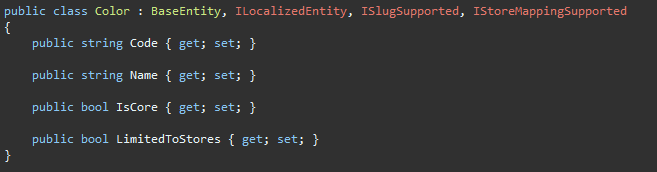
The following is the SQL tables, where color has a field IsCore to indicate if it is a core color, and ColorMapping has a composite key that does the mapping. Fairly straight forward.


In nopCommerce, I built a custom admin screen that does the mapping. For those who are curious, the titles are dynamically pulled from the core colors in the table with IsCore flag set to true. This is similar logics I get from the Shipping Method Restrictions screen.


So far so good. One thing that got me though is the EF Configuration.

Trying random things will get different kind of errors.


How about try to copy from the ShippingMethodMap? (It is located in Nop.Data\Mapping\Shipping\) Afterall, it has the same SQL structure. The .HasMany .WithMany approach were a bit messy and didn't quite well for me.

The simplest approach seems to work for me. In my ColorMappingMap, I created a composite key and ignore the field Id. Remember, we don't have Id in the SQL table.


While on the topic of fashion industry. I just received my invitations to the Mercedes-Benz Fashion Week Australia SS 14/15 in April. Who is going?


Calculate age in .Net

Scope

I wanted to calculate a person's age in .Net. I am a little disappointed there is no SQL-like DateDiff function in .Net Framework.
If you search on Google, you will find these with high rank and votes.
I didn't like the idea of converting dates to float back and forth so that you can add milliseconds to the date or trying to divide the date by 365.242199 so that we are catering leap years that occur every 4 years but not the 100th but then the 400th year again and so on….

Solution

If someone ask me how old am I, it is simple logical process.
  • What year am I in? 
  • What year did I born? 
  • And have I had my birthday this year yet?
With this in mind, the pseudocode is simple. If I didn’t pass my birthday, then my age is calculated by this year but take out 1.

public int? Age
{
    get
    {
        return (DateTime.Today.DayOfYear >= DOB.DayOfYear)
                    ? (DateTime.Today.Year - DOB.Year)
                    : (DateTime.Today.Year - DOB.Year - 1);
    }
}