Pages - Menu

Showing posts with label Serialization and Deserialization. Show all posts

How to remove all namespaces from XML with C#?

Scope

How to remove all namespaces from XML with C# is a commonly found questions in developments. It is not the best practice to remove the namespace and I see it as an anti-pattern to remove it rather than utilizing it, but there are cases that this can be an 'acceptable' solution.

One of the example could be this - Converting a DTD / XSD to strongly typed C# class

In this scenario, I was working with multiple servers that their returning namespaces are different each time, and the serializer fail to validate the namespace. Given the return xml is only so short lived and it was not worth the effort to implement multiple or dynamic namespaces.

Solutions

After looking up the stackoverflow, I was a little surprise that the first few answers seem to have issues with attributes being remove. They did not seem to serve the purpose of what they were asking - A clean, elegant and smart solution to remove namespacees from all XML elements.

Since no working solutions are available to me, I had an attempt to write my own as follow.

public static XElement RemoveAllNamespaces(this XElement element)
{
    return new XElement(element.Name.LocalName,
        element.HasAttributes ? element.Attributes().Select(a => new XAttribute(a.Name.LocalName, a.Value)) : null,
        element.HasElements ? element.Elements().Select(e => RemoveAllNamespaces(e)) : null,
        element.Value);
}

And I have tested the code with the following XML that have multiple level of nodes and attributes.


The 4 liner solution all serve it's purpose.

  1. Firstly, it creates the root node
  2. Appends all attributes
  3. Append all elements 
  4. Lastly, the value


The trick is in line 3, where it picks all the elements() and pushed back to it's own function from the current element. Thus, recursively doing the same thing for all the nodes.

The magic for it to work is the elegant way of how the XElement constructor works. I often found using XElement will end up with a 1 liner solution because of it's constructor, so a good coding style and line breaks will really help the next person who read your code.

Did my solution look clean, elegant and smart to you? Share your thoughts :)

Converting a DTD / XSD to strongly typed C# class

We are looking to implement some CyberSource Reporting functions that our system will be able to poll CyberSource for various reports, and call different actions base on the result. After going through the documentations, we know the CyberSource portals are providing us the DTD definitions.

Prerequisite

Implementation

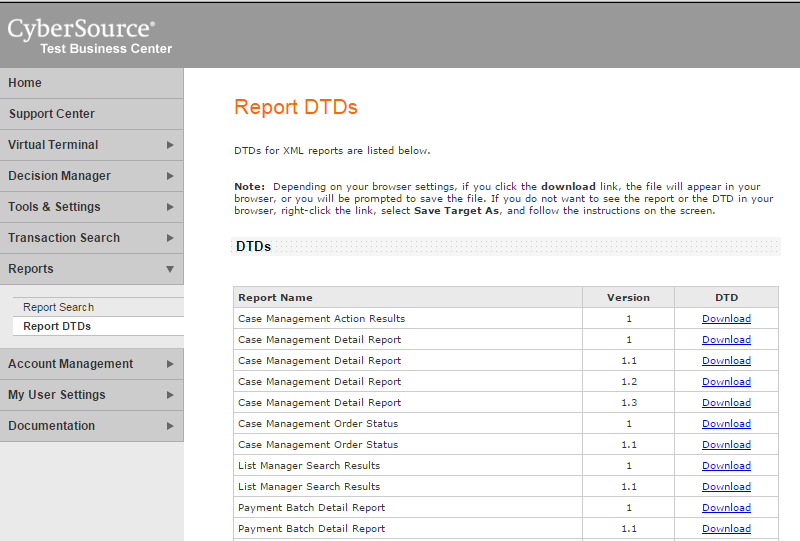
Firstly we will need to download the DTD from the CyberSource portal.


We want to generate the strongly typed model class from the DTD definition, but we will need to convert this into XSD first. This can be done the XML Create Schema function via Visual Studio.


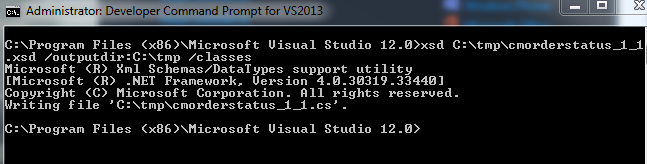
We are now able to generate the C# class by using the XSD.exe. It is available via the Visual Studio Developer Command Prompt.


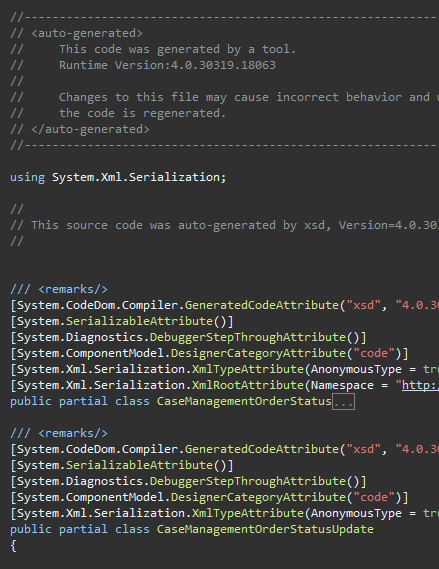
The generated file will look something like this.


Troubleshooting

[System.InvalidOperationException]: {"<xxx xmlns='some_uri'> was not expected."}

During developments, we got an exception of "There is an error in XML document (0, 0)." and the inner exception is "<Report xmlns='https://ebctest.cybersource.com/ebctest/reports/dtd/cdr.dtd'> was not expected."

This is due to the DTD that we downloaded had a namespace of vendor's live site, therefore our strongly typed class has a name space of the live URI too. However when we are connected to their sandbox, throws an exception as the namespace didn't match.

One approach would be dynamically changing the namespace according to our connections, but I chose an easier way.

Firstly, I removed the namespace from the System.Xml.Serialization Xml Attributes in our generated strongly typed object class.


We will also need to remove the namespace from the incoming xml before we do any deserialization. This can be achieved by creating an extension method to recursively remove all namespaces from all nodes.
private ConversionDetailReport GetConversionDetailReport(string xmlString)
{
    var serializer = new XmlSerializer(typeof(ConversionDetailReport));

    var xDoc = XDocument.Parse(xmlString);

    var xr = xDoc.Root.RemoveAllNamespaces().CreateReader();

    return (ConversionDetailReport)serializer.Deserialize(xr);
}

Xml Deserialization with Namespace Prefix in C#

Scope

  • To deserialize an xml from a 3rd party vendor into a strongly typed C# object.
  • The xml has a namespace attached.
  • No DTD or XSD were provided by vendor.

Steps

XML Schema Definition Tool (Xsd.exe)


Basically 2 command lines I executed:
  1. I first created the xsd file from a sample xml file that I have.
  2. Then I created the cs class file for the model by using the xsd scheme. 

Model

It is the best to generate model via Xsd tool because it contains a lot of System.Xml.Serialization Attribute that are needed for the serializer. Especially around the namespace area!! 

The class file will look something like this. A typical model class with lots of attribute hints.


Serializer

All the hard works were done for generating the model and xml attributes. That left this part a bit simple in comparison. It is a bit similar to Autofac, where the hard works are done at the entity level and the actual conversion is just 1 line of ToEntity().

The code looks like this. Some people managed to do this in 2 lines, but I found 4 lines look pretty neat for readability and my troubleshooting.


Troubleshoot


Unbounded Complex Type Bug

1 of the error that I ran into looks like this.

Unable to generate a temporary class (result=1). error CS0030: Cannot convert type

It is a confirmed Microsoft bug and won't be fixed.

The work around is to change the unbounded or add a dummy element for the complex type.


I added the element and regenerated the model class file, and the serializer is happy again.

Xsd generated incorrect schema

The xml schema reverse engineered by using xsd.exe from a sample xml file is slightly incorrect. It predicted I might have multiple child nodes, thus the class generated had all these unnecessary array declaration.

Looks like this.

   1: public MyComplexType Notes []


I would not blame the xsd tool but there are some manual works required to fix it. (Or C# code will end up with a lot of .FirstOrDefault()

XElement.Name.LocalName

As described before, there is a fallency of trying to access the element via XElement.Name. This method only works when there is no namespace. Out of curiosity and I read further that the correct way is to use XElement.Name.LocalName. I wouldn't recommend going down this path, but it is interesting to know that how we conventionally accessing an element name incorrectly (when you have namespace).

http://msdn.microsoft.com/en-us/library/system.xml.linq.xelement.name%28v=vs.110%29.aspx