Pages - Menu

Showing posts with label XML. Show all posts

Demandware - Implementing 3rd party FTP Service for XML Drop

Scope

I developed a few Demandware cartridges that export xml via ftp for 3rd party integration. A few things that I have done such as:-


  • Piggy back a ftp drop task to the current job schedule that imports xml from a difference integration point
  • Using standard Demandware pipelet to generate a xml feed for ftp drop
  • Create a custom script node to generate a xml feed for ftp drop
It wasn't too difficult as a job, but I found a few hidden gotchas that I believe are noteworthy.


We are dealing with the latest Demandware version 16.7.

Technical

FTP Constraints

  • Ftp connection is established using passive transfer mode (PASV) only.
  • Demandware only support ftp and sftp for backend integration, no ftps.
  • Use FTPClient for ftp; and SFTPClient for sftp.

ArrayList

In our code, we use dw.util.ArrayList to filter out products for export. We ran into an error where the ArrayList cannot be bigger than 20,000 in size.

Front End Debugging

I was testing out a pipeline-startnode by direct url from a broswer, it did not turn out well because some of the pipelets can only be executed from the backend. The error message looks like this.

com.demandware.core.quota.QuotaExceededException:
Limit for quota 'api.pipelet.ImportExport' exceeded. Limit is 0, actual is 1.

Job Schedule

We tried to schedule a job for our cartridge and learnt in a hard way that JS Controller is not supported for Business Manager Job Schedule. Only pipeplines can be used.

Traversing XML

If you happened in need of traversaing the xml, Demandware uses ECMA scripts for XML. Here is a quick start guide.

Firewall

Besides the firewall rules that I needed to manage with our external vendor, we also need to request outbound firewall rule from Demandware.

As they pointed out in their doc, "Before you can make an outbound FTP connection, the FTP server IP address must be enabled for outbound traffic at the Demandware firewall for your POD. Please file a support request to request a new firewall rule".

From Demandware, there are steps to request a Firewall rule to allow outgoing connections to 3rd party services.

How to remove all namespaces from XML with C#?

Scope

How to remove all namespaces from XML with C# is a commonly found questions in developments. It is not the best practice to remove the namespace and I see it as an anti-pattern to remove it rather than utilizing it, but there are cases that this can be an 'acceptable' solution.

One of the example could be this - Converting a DTD / XSD to strongly typed C# class

In this scenario, I was working with multiple servers that their returning namespaces are different each time, and the serializer fail to validate the namespace. Given the return xml is only so short lived and it was not worth the effort to implement multiple or dynamic namespaces.

Solutions

After looking up the stackoverflow, I was a little surprise that the first few answers seem to have issues with attributes being remove. They did not seem to serve the purpose of what they were asking - A clean, elegant and smart solution to remove namespacees from all XML elements.

Since no working solutions are available to me, I had an attempt to write my own as follow.

public static XElement RemoveAllNamespaces(this XElement element)
{
    return new XElement(element.Name.LocalName,
        element.HasAttributes ? element.Attributes().Select(a => new XAttribute(a.Name.LocalName, a.Value)) : null,
        element.HasElements ? element.Elements().Select(e => RemoveAllNamespaces(e)) : null,
        element.Value);
}

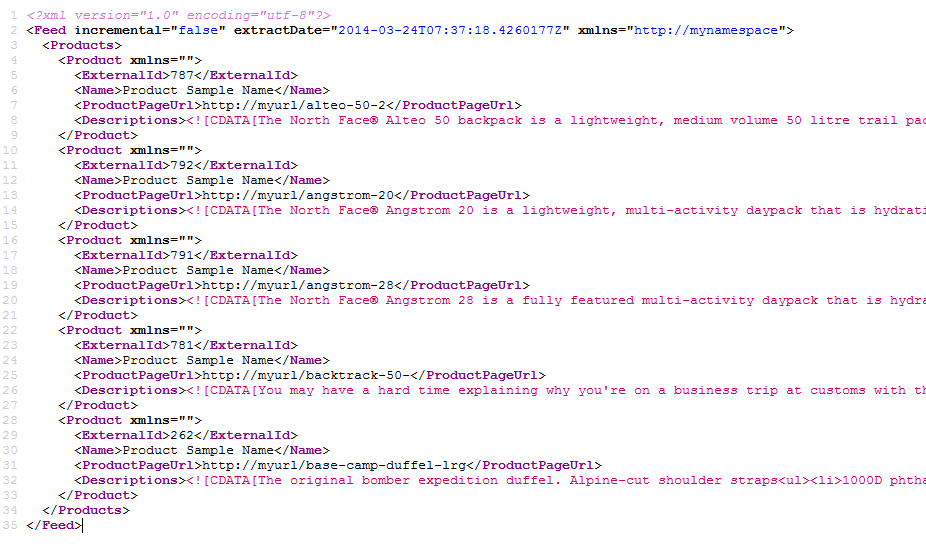
And I have tested the code with the following XML that have multiple level of nodes and attributes.


The 4 liner solution all serve it's purpose.

  1. Firstly, it creates the root node
  2. Appends all attributes
  3. Append all elements 
  4. Lastly, the value


The trick is in line 3, where it picks all the elements() and pushed back to it's own function from the current element. Thus, recursively doing the same thing for all the nodes.

The magic for it to work is the elegant way of how the XElement constructor works. I often found using XElement will end up with a 1 liner solution because of it's constructor, so a good coding style and line breaks will really help the next person who read your code.

Did my solution look clean, elegant and smart to you? Share your thoughts :)

Xml Deserialization with Namespace Prefix in C#

Scope

  • To deserialize an xml from a 3rd party vendor into a strongly typed C# object.
  • The xml has a namespace attached.
  • No DTD or XSD were provided by vendor.

Steps

XML Schema Definition Tool (Xsd.exe)


Basically 2 command lines I executed:
  1. I first created the xsd file from a sample xml file that I have.
  2. Then I created the cs class file for the model by using the xsd scheme. 

Model

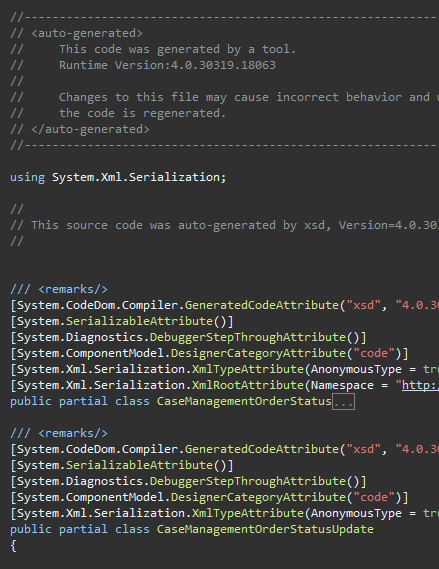
It is the best to generate model via Xsd tool because it contains a lot of System.Xml.Serialization Attribute that are needed for the serializer. Especially around the namespace area!! 

The class file will look something like this. A typical model class with lots of attribute hints.


Serializer

All the hard works were done for generating the model and xml attributes. That left this part a bit simple in comparison. It is a bit similar to Autofac, where the hard works are done at the entity level and the actual conversion is just 1 line of ToEntity().

The code looks like this. Some people managed to do this in 2 lines, but I found 4 lines look pretty neat for readability and my troubleshooting.


Troubleshoot


Unbounded Complex Type Bug

1 of the error that I ran into looks like this.

Unable to generate a temporary class (result=1). error CS0030: Cannot convert type

It is a confirmed Microsoft bug and won't be fixed.

The work around is to change the unbounded or add a dummy element for the complex type.


I added the element and regenerated the model class file, and the serializer is happy again.

Xsd generated incorrect schema

The xml schema reverse engineered by using xsd.exe from a sample xml file is slightly incorrect. It predicted I might have multiple child nodes, thus the class generated had all these unnecessary array declaration.

Looks like this.

   1: public MyComplexType Notes []


I would not blame the xsd tool but there are some manual works required to fix it. (Or C# code will end up with a lot of .FirstOrDefault()

XElement.Name.LocalName

As described before, there is a fallency of trying to access the element via XElement.Name. This method only works when there is no namespace. Out of curiosity and I read further that the correct way is to use XElement.Name.LocalName. I wouldn't recommend going down this path, but it is interesting to know that how we conventionally accessing an element name incorrectly (when you have namespace).

http://msdn.microsoft.com/en-us/library/system.xml.linq.xelement.name%28v=vs.110%29.aspx

Return XML Datafeed in a MVC Action Result

Scope

We are trying to export our products in an xml feed. This will be provided to 3rd party vendor so they can provide search or product reviews for our products, or simply froogle.

I am building a MVC action that will return the XML result in the page when a url is called (so it should display the xml as content in the browser, and view source of the page should show the actual xml file).


Problem

During this exercise, I encountered the following errors:-
  • Error message about prefix '' cannot be redefined from '' tag
  • Missing XML Declaration
  • Getting a declaration of UTF-16 instead of UTF-8
  • '', hexadecimal value 0x03, is an invalid character
It is a multiple failure and apparently they are all common and valid errors.

Solutions


This "little" piece of code fixed quite a few things.

Name Space Prefix

Initially, I tried to put namespace in the XDocument as a XAttribute, that was causing error and the correct way is to add XDeclaration to the Element name.

Declaration

I intentionally put the declaration in string with the xml.ToString(), there were other solutions like using MemoryStream and Save() to "conserve" the declaration, I just found that is overkilling for such a simple thing.

This also resolve the issue where conversations of MemoryStream that caused UTF-8 became UTF-16.

Invalid Character 

This is because the object (string) that I pass in to the XElement has invalid character. There easiest way and most effective way is to Sanitize the input. I wrote an extension method for this.

CDATA

Another issue that might arise is the value for XElement might have HTML tags in it. Again, this can be done by another extension method to wrap the value in a CDATA object, the reason for the extension method is this will cater for null value and it looks neater.


When Pivot and CTE meet together by Dynamic SQL

Scope

Today have to do something with pivot in dynamic SQL, I tweaked the scenario a bit so I am not giving out any client information.

Objectives

To create a sproc that retrieve a list of entries (candidates) with their basic info, answers (if any) for their corresponding questions in a result set.

Database Table Structure

  • Candidates
  • CandidateCategories
  • CandidateInCategories
  • Core Questions
  • Core Answers
    • CandidateID - FK
    • CoreQuestionID - FK
  • Optional Questions
    • CandidateCategoryID - FK
  • Optional Answers
    • CandidateID – FK
    • OptionalQuestionID - FK

Technical Requirements

  • Performance is not an issue, it will run less than 5 times a year
  • Need to pull out basic info of the candidate and their answer to questions, 1 candidate per row.
  • All Core and all Optional Questions will become the column header of the result set.
  • Depends on which categories that candidates in, they will have zero to all optional answers.
  • An extra column to be generated to indicate the Candidate Category, just before the columns of the set of questions.
  • Categories are to be sorted in order base on a column name CandidateCategory.CategoryOrder
  • Questions are to be sorted in order base on a column name QuestionNumber in CoreQuestion and OptionalQuestion
  • This column is ‘yes’ / ‘no’ depends if the candidate had answered any optional questions in that category.
  • Questions are unlimited and dynamically entered by clients.

Technical Overview

We know this much so far:- 
  • The result set is some kind of join between Candidate (for the basic info) and questions / answers.
  • Obviously pulling out questions by using select * from then join will not get the questions span to the column names, this is some kind of transpose with pivot, but it is only partial. Basic info do not require transpose.

Solution Overview

CTE for information

Let’s walk through the code steps by steps. I know I need to get information from multiple tables, this information will be used exactly twice. Once to generate the questions in column header and once to do the partial transpose.

-- Column definition, questions in this case
DECLARE @cols AS NVARCHAR(MAX)
DECLARE @query AS NVARCHAR(MAX)
Declare @WithQuery as NVARCHAR(MAX)
;


-- Question (column names) not to exceed 128, this is SQL Standard

Set @WithQuery = '
with cte
as
(
    SELECT  e.ItemID as CandidateID,
            cq.CandidateCategoryID,
            left(cast(ac.CandidateCategoryID as varchar(10)) + '' - '' + ac.Name, 128) as Question,
            Case
                when eca.AnswerID is null then ''No''
                else ''Yes''
            End  as Answer,
            ac.CategoryOrder as CategoryOrder,
            -1 as QuestionNumber
    FROM    Candidate e
    CROSS JOIN OptionalQuestion cq
    LEFT JOIN OptionalAnswer eca ON eca.QuestionID = cq.QuestionID AND eca.CandidateID = e.CandidateID
    JOIN CandidateCategory ac ON (ac.CandidateCategoryID = cq.CandidateCategoryID)

    UNION

    -- Core Questions

    SELECT  e.ItemID as CandidateID,
            -1,
            left(''Core Q'' + cast(cq.QuestionNumber as varchar(10)) + '' - '' + cq.Question, 128) as Question, 
            eca.Answer,
            -1 as CategoryOrder,
            cq.QuestionNumber
    FROM    Candidate e

    CROSS JOIN CoreQuestion cq
    LEFT JOIN CandidateCoreAnswers eca ON eca.QuestionID = cq.ItemID AND eca.CandidateID = e.ItemID
    WHERE    (@Filter1 IS NULL OR e.Filter1 = @Filter1)
    AND        (@Filter2 IS NULL OR e.Filter2 = @Filter2)
    AND        (@Filter3 IS NULL OR e.Filter3 = @Filter3)

    UNION

    -- Optional Questions

    SELECT  e.ItemID as CandidateID,
            cq.CandidateCategoryID,
            left(cast(ac.CandidateCategoryID as varchar(10)) + '' - Optional Q'' + cast(cq.QuestionNumber as varchar(10)) + '' - '' + cq.Question, 128) as Question, 
            eca.Answer,
            ac.CategoryOrder as CategoryOrder,
            cq.QuestionNumber
    FROM    Candidate e
    CROSS JOIN OptionalQuestion cq
    JOIN CandidateCategory ac ON (ac.ItemID = cq.CandidateCategoryID)
    LEFT JOIN OptionalAnswer eca ON eca.QuestionID = cq.QuestionID AND eca.CandidateID = e.CandidateID

 WHERE    (@Filter1 IS NULL OR e.Filter1 = @Filter1)
    AND        (@Filter2 IS NULL OR e.Filter2 = @Filter2)
    AND        (@Filter3 IS NULL OR e.Filter3 = @Filter3)
)
'

  • All the required information is now stored in CTE
  • Interesting point to note is column names must be less than or equal to 128 characters even though it is generated dynamically and not stored in sysname.
  • Line 22, –1 as question number will display the category before the question
  • Line 36, similarly, –1 as category order will display core questions before optional.


STUFF and QUOTENAME by XML PATH for column header

Set @query = @WithQuery + '
Select @cols = STUFF(
                    (SELECT '','' + QUOTENAME(c.question)
                     from (    select distinct CategoryOrder, QuestionNumber, question from cte ) c
                     Order by CategoryOrder, QuestionNumber
                     FOR XML PATH(''''), TYPE
                    ).value(''.'', ''NVARCHAR(MAX)'') 
        ,1,1,'''')
'

exec sp_executesql @query,
    N'@Filter1 int,
      @Filter2 int,
      @Filter3 int,
      @cols nvarchar(max) output',
      @Filter1 = @Filter1,
      @Filter2 = @Filter2,
      @Filter3 = @Filter3,
      @cols = @cols output

  • Line 1, reusing the CTE (should have called it @CTE but anyway)
  • The result is a massive long string that has all the questions


Dynamic SQL


set @query = @WithQuery  + '

SELECT    e.info1, e.info2, e.info3, e.infoN, r.info, derived.*
FROM    Candidate e
LEFT JOIN    OtherInfo r ON (e.OtherInfoID = r.OtherInfoID)
JOIN    (
    SELECT CandidateID, ' + @cols + ' from 
                (
                    select CandidateID
                        , isnull(answer, '''') as answer
                        , question
                    from cte
               ) x
                pivot
                (
                    max(answer)
                    for question in (' + @cols + ')
                ) p
) derived on derived.CandidateID = e.CandidateID
WHERE    (@Filter1 IS NULL OR e.Filter1 = @Filter1)
AND        (@Filter2 IS NULL OR e.Filter2 = @Filter2)
AND        (@Filter3 IS NULL OR e.Filter3 = @Filter3)

;
'

exec sp_executesql @query,
    N'@Filter1 int,
      @Filter2 int,
      @Filter3 int',
      @Filter1 = @Filter1,
      @Filter2 = @Filter2,
      @Filter3 = @Filter3

  • Line 3, derived is the questions and answers that will be transposed
  • Line 5, Candidate info can be drawn from Canddate table or join other tables for more information, just normal join stuff.
  • Line 6 – 18 is the tough part for doing the pivot (transpose), notice how line 7 and 17 use @cols dynamically appended to the @Query
  • Line 16 uses max for aggregation, noticed it became a limit that 1 candidate can only have 1 answer record per question.