Pages - Menu

Showing posts with label Multi Tenant. Show all posts

nopCommerce - Multi Tenancy - Round 3

Multi Tenancy in nopCommerce by itself seems like an on going project for me now. Previously, I talked about how I was able to create brand specific dll in one share code base. (No splitting / branching in Source Control, one code base only). I used MS Build to separate the dlls during compilation which is neat but clumsy, as most developers would overlook these places. These can be found in here.

http://tech.sunnyw.net/2014/07/nopcommerce-multi-tenancy-2.html
http://tech.sunnyw.net/2014/05/nopcommerce-multi-tenancy.html

Scope

Previously I mentioned,
nopCommerce uses App_Data\Settings.txt to store database connection string... it became a hassle to swap connection string for local development as web config transformation does not help...
The problem arise not only with development environment that I have to constantly swap connection string, but in the event of multi tenancy with same code base and separated database, the code needs to connect to the correct database automatically.

Also, this cannot be simply done by a plugin or a check of store id in nop, as we would need to connect to the right database to get the store context.

Last but not least. This article is base on nopCommerce 3.3.

Objective

  • During developments, the correct database will be picked for multiple bindings without changing Settings.txt.
  • During deployment, the correct connection string applied to the websites without manually changing the Settings.txt in production environment.
  • Conform with the nopCommerce coding standard, so we are making the least changes. Best coding practice comes after this.

Setup

For our development environment, we will add multiple domain bindings to one website.

Note we only need to bind once for all https traffic. Https binding always work on IP base not domain base, as domain information is stored in HTTP Header that is encrypted as part of the https protocol.


Although nopCommerce doesn't have multi-tenancy supported out of the box, but its multi-store functionality will help assign different stores base on the url. I have previously demonstrated that.

Note that we would not do multi binding for live environment as we still want to have separate app pool for different websites for now,

Code

Settings.txt


We need to create a bunch of Settings_{site}.txt, one for each site.

Settings_site1.txt
Settings_site2.txt
...

We will have different connection strings in each Settings.txt files.

DataSettingsManager.cs


Ideally I would like to extend this class and override the method in my own class. Unfortunately, this class does not implement any interface and no IoC involved. Plus, some vendor plugins also hard-coded the way how to instantiate this object, usually find in plugins that create their own ObjectContext.

In the LoadSettings and SaveSettings method, we will change the way how filename is picked by default to our private function.

filePath = Path.Combine(MapPath("~/App_Data/"), GetSettingFileName());

private string GetSettingFileName()
{
    var dbSettingName =  ConfigurationManager.AppSettings["DBSettingName"];
    var filePath = Path.Combine(MapPath("~/App_Data/"), dbSettingName);
            
    if (File.Exists(filePath))
    {
        return dbSettingName;
    }

    return filename;
} 

Web.config Transformation


We added a new key in the web config.
<add key="DBSettingName" value="Settings_site1.txt" />

We also need to provide transformation for each build config.
<add key="DBSettingName" value="Settings_site2.txt" xdt:Transform="SetAttributes" xdt:Locator="Match(key)" />

Switch


To switch between sites during developments, we will use SlowCheetah to help transform our web.config. The correct connecting string will be picked via web config.


Conclusion

This is a step forward towards turning our sites to true multi-tenants environment. During development, I am now able to connect to the corresponding database just by transforming the webconfig.

In the future, I am hoping a particular store will always connect to its own db even if I bind multiple sites to only one set of dlls (one IIS website). Then I will be able to scale out the websites and provide high availability.
  • Brand specific dependencies need to be removed from web.config to another persistent storage. Maybe a share database or some sort.
  • Need to change how DataSettingsManager is instantiated. It needs to be done via IoC so it can be extended.
  • Find a balanced approach for scalibility.

nopCommerce - Multi Tenancy - Round 2

Multi Tenancy in nopCommerce by itself seems like an on going project for me now. Previously (http://tech.sunnyw.net/2014/05/nopcommerce-multi-tenancy.html), I blogged about how I was able to create brand specific dll in one share code base. (No splitting / branching in Source Control, one code base only). I used MS Build to separate the dlls during compilation which is neat but clumsy, as most developers would overlook these places.

Scope

As previously suggested,
It is not so easy to deploy, as I need to build the project once per brand (so it will generate different dlls)
This technique rely on the developers to build a different BrandedService.dll that the IoC will pick up via IDependencyRegistrar. This gives different brands a slightly different set of dlls as it was hard to maintain.

At the end of this session, we want to achieve,
  • Only build once and use the same set of dlls across all brands.
  • Easy for the developers to deploy.

Code

  • We store a unique id "BrandId" in our Web.config, and of course we will utilize web config transformation for this matter.
  • In the DependencyRegistrar for each brand project, we only register the classes if the brand id matches.
  • IoC will register different concrete classes during reflection (as usual).
  • Brands without matching ids simply will have the register logic skipped (although the IoC will still run the through the class because they all implement the IDependencyRegister.
As demonstrated in code, this is the DependencyRegister for TNF.Services and Speedo.Services.


A snapshot of the bin folder shows the dlls are exactly the same for different tenants.


There will be a redundant TNF dlls in Speedo project and vice versa, but my time is more valuable than a few kb dll, so I think this is a better approach. Removal of redundant dlls will not break the site :)

Nop.Web

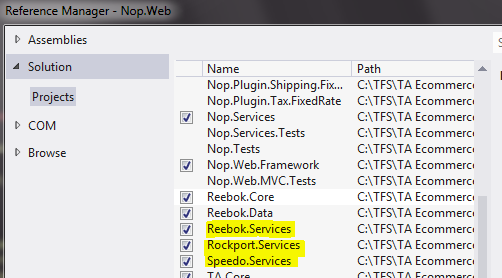
In our web project, we need to voluntarily register all our Brand.Services dll, this will force MSBuild to include all the dlls during build or publish.


Conclusion

Both of these approach have their pros and cons. I am sure there will be other ways doing this too. The key is the developers or the team must be comfortable with the process, and the people doing it are happy about it.

Further Improvement

nopCommerce uses App_Data\Settings.txt to store database connection string. This works fine for staging or live site as we just need to skip App_Data during deployment. However, it became a hassle to swap connection string for local development as web config transformation does not help in this situation. More into this topic next time.


nopCommerce - Hello World to Multi Tenancy

Finally, it is about time to do some multi tenant works. Let's recap my goal and how I am travelling so far.

Scope

  • Build a multi tenant e-commerce platform for 15 or more international brands.
  • They are completely different brands and target consumers are completely different.
  • They will share some similarities in terms of functionalities but there will be customizations for individual brands
  • Administrator of a brand can only see stuff about their own brand.
  • Easy to develop
  • Easy to deploy
  • Easy to maintain
  • There is NOT necessary a super admin role to overlook ALL the brands.
  • Customers are NOT shared across brands.

Preparation

So far, I have built my first brand with the above scope in mind, the following strategies were implemented.

Specification

Since our first site went live, we are now ready for our next brand and the following needs to bear in mind with the followings:
  • Separate the brand specific codes in separated dll.
  • Database to be considered at later stage.
  • No brand specific code at controller level.
  • Views for different brands are handled by Nop Theme.
  • We will deploy for all the brands from the same Visual Studio Solutions.

Decision Making

Get Dirty with Code


Project Setup

Notice I am skipping some of the steps and only covering the key points. (eg. Add references, routes, register dependency etc...) They are covered previously.


I created a Misc Service and an interface for our platform.


Then I create brand specific services in the relevant projects.


Build Configuration

With the default Debug configuration, we will clone a set of new build configs per projects. In each build, we only include one brand dll at a time. (Only service dll in this example)


Only for the relevant build configurations of the brand projects, we will set the dll output path to the same as the Nop.Web project.


Controller

We setup a controller that will consume ITAMiscService and return the brand name. Notice how the controller does not have knowledge to the concrete class but only the ITAMiscService interface.


Hello World to Multi Tenancy


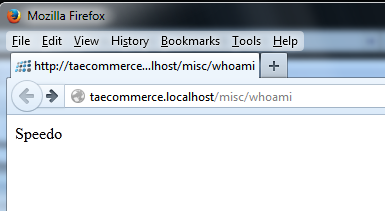
Who am I?

By changing the build configuration, I am able to change my workspace to the corresponding brand.


This is achieved by a MS Build trick.
  • The brand projects are not referenced anywhere (very important)
  • Therefore, when we build Debug, there will not be any brand specific dlls.
  • We used build configurations to trick MS Build to dump the brand dll to the web project for relevant brands.
  • Autofac reflection will pick up the brand dll if they exists, because of the way how Nop Dependency Register works.

Caution

  • Use clean solution in between the building of different brand environments (to delete any brand dlls).
  • Pay attention to the dlls in the Nop.Web bin folder. Occasionally the clean solution do not delete everything in the bin folder. Then we will need to manually clear this folder.
  • Always check Who am I to make sure you are working in the right brand.

Further Improvement

  • It is not so easy to deploy, as I need to build the project once per brand (so it will generate different dlls)
  • Unfortunately in practice, clean solution doesn't always work. For anyone who familiar with MS Build, we could create pre-build event to properly clean up the solutions (instead of relying on Visual Studio)
  • Combine MS Build with PowerShell, we can implement a way to "quick switch" dlls for different brands.