Pages - Menu

Re-runnable SQL Scripts for DDL and DML

At some point of time in my career, I was in a role that I would prepare scripts for auto-refresh the database by running some SQL migration scripts, so that the database will match the latest binaries.

Concept

Here is my definition of re-runnable SQL scripts.
A SQL script is re-runnable if and only if the script will only have impact to the SQL server exactly once regardless how many times you run the script.
This is a very important aspect if we are able to re-run some upgrading scripts without worrying about what-to-run and what-not-to-run during developments or deployments. Let alone continuous integration.

Implementation

There is a pattern in re-runnable SQL script. I will try to document as much as I could, but if you could learn the pattern instead of the code, then you can use it in any DDL (Data Definition Language) or DML (Data Manipulation Language).

Add column to existing table

If not exists(Select 1 from sys.columns where Name = N'PublishDate' and Object_ID = Object_ID(N'BlogPost'))
Begin
 Alter Table dbo.BlogPost 
 Add PublishDate datetime NULL

 Print 'INFO - Column PublishDate is added for table BlogPost successfully.'
End
Else
Begin
 Print 'WARNING - Column PublishDate already exists for table BlogPost.'
End
Go

Pay attention to the if-else logic, we simply put our DDL inside a if clause. Too simple?

If we run the above script twice, you would expect it not running the second time.

As we can see in the result pane, the DDL will not run the second time. 

Create table

If not exists(Select 1 from sys.tables where Name = N'Fit')
Begin

 CREATE TABLE [dbo].[Fit](
  [Id] [int] IDENTITY(1,1) NOT NULL,
  [Code] [varchar](50) NOT NULL,
  [Name] [varchar](255) NOT NULL,
  [SubjectToAcl] [bit] NOT NULL CONSTRAINT [DF_Fit_SubjectToAcl]  DEFAULT ((0)),
  [LimitedToStores] [bit] NOT NULL CONSTRAINT [DF_Fit_LimitedToStores]  DEFAULT ((0))
 ) ON [PRIMARY]

 Print 'INFO - Table Fit created successfully.'
End
Else
Begin
 Print 'WARNING - Table Fit already exists.'
End
Go

Add PK

If not exists(Select 1 from sys.key_constraints where parent_object_id = Object_id('Fit'))
Begin
 ALTER TABLE dbo.Fit 
 ADD CONSTRAINT PK_Fit PRIMARY KEY CLUSTERED (Id) ON [PRIMARY]

 Print 'INFO - PK Fit added successfully.'
End
Else
Begin
 Print 'WARNING - PK Fit already exists.'
End
GO

Alter an existing column NULL to NOT NULL


In this scenario, we are changing a column from nullable to non-nullable. Things get a little tricky here

The first if statement act as a precaution to check if the column exists, because we cannot modify a column if it does not exist and it will throw error and causing the script to stop.

The second if statement depends on what you are modifying from. If we were changing nvarchar(50) to nvarchar(max), we would have written it differently. Also, depending on your technical requirement, you may want to force the column to be nvarchar(max) regardless, or it may not be an issue at all. It really DEPENDS!!

If exists(Select * from sys.columns where Name = N'Keyword' and Object_ID = Object_ID(N'SearchTerm'))
Begin
 If not exists(Select * from sys.columns where Name = N'Keyword' and Object_ID = Object_ID(N'SearchTerm') and Is_nullable = 0)
 Begin

  Alter Table dbo.SearchTerm 
  Alter column Keyword nvarchar(max) NOT NULL

  Print 'INFO - Column Keyword is altered for table SearchTerm successfully.'
 End
 Else
 Begin
  Print 'WARNING - Column Keyword is already non-nullable for table SearchTerm.'
 End
End
Else
Begin
 Print 'ERROR - Column Keyword does not exists in table SearchTerm.'
End
Go

For argument sake, should I also be checking if table exists when I am adding a column to a table too? That's right. It will throw error if we try to add a column to a non-existing table. In my technical situation though, I know I am expecting the table there, but that would be a nice pre-caution. Therefore, it DEPENDS on your technical structure.

Alter an existing column TEXT to VARCHAR(MAX)


Slightly different approach to the above. I join the system types table to find out the definition of the column.

If exists( Select * from sys.columns C 
   join sys.types T on T.system_type_id = C.system_type_id
   where C.Object_ID = Object_ID(N'MyTable')
   and C.Name = 'Description'
   and T.Name = 'text')
Begin

 Alter Table dbo.MyTable 
 Alter column [Description] varchar(max) NULL

 Print 'INFO - Column Description is altered for table MyTable successfully.'
End
Else
Begin
 Print 'WARNING - Column Description is already not text type for table MyTable.'
End
Go

Insert Data with Identity Insert


Notice you must have the keyword go after turning identity insert on/off, but since you can't have go inside begin/end, the statements will be outside of the if-block.

SET IDENTITY_INSERT [dbo].[TaxCategory] ON 
GO

If not exists (Select 1 from TaxRate where TaxCategoryId = 6 and CountryId = 6)
Begin

 INSERT [dbo].[TaxRate] ([TaxCategoryId], [CountryId], [StateProvinceId], [Zip], [Percentage], [StoreId]) VALUES (6, 6, 0, NULL, CAST(10.0000 AS Decimal(18, 4)), 0)
 
 Print 'INFO - Data for TaxRate.[TaxCategoryId] = 6 and TaxRate.[CountryId] = 6 inserted successfully.'
End
Else
Begin
 Print 'WARNING - Data for TaxRate.[TaxCategoryId] = 6 and TaxRate.[CountryId] = 6 already exists.'
End
GO

SET IDENTITY_INSERT [dbo].[TaxCategory] OFF
GO

Update Data - Exact match

If not exists (Select 1 from Country where Published = 1 and TwoLetterIsoCode = 'AU')
Begin

 Update Country
 Set Published = 1
 where TwoLetterIsoCode = 'AU'

 Print 'INFO - Data for Country.Published = 1 for TwoLetterIsoCode = ''AU'' updated successfully'
End
Else
Begin
 Print 'WARNING - Data for Country.Published = 1 for TwoLetterIsoCode = ''AU'' already updated.'
End
GO

Update Data - Multiple matches


The if clause is slightly different to above. It checks for if exists not equal to instead of if not exists equal to. That is because we want to update all the records as long as there is one or more than one record is returned when the where clause match.

If exists (Select 1 from Country where Published = 1 and TwoLetterIsoCode <> 'AU')
Begin

 Update Country 
 Set Published = 0
 where TwoLetterIsoCode <> 'AU'

 Print 'INFO - Data for Country.Published = 0 for TwoLetterIsoCode <> ''AU'' updated successfully'
End
Else
Begin
 Print 'WARNING - Data for Country.Published = 0 for TwoLetterIsoCode <> ''AU'' already updated.'
End
GO

Delete with conditions


If exists (Select 1 from [ShippingMethod] where [Name] = 'Australia Post, Regular Parcels')
Begin
 Delete [ShippingMethod]
 where [Name] <> 'Australia Post, Regular Parcels'

 Print 'INFO - Data for ShippingMethod <> ''Australia Post, Regular Parcels'' deleted successfully.'
End
Else
Begin
 Print 'INFO - Data for ShippingMethod <> ''Australia Post, Regular Parcels'' already deleted.'
End
GO

Conclusion

.Net developers might already notice I adopted some of the .Net logging technique in the print messages. That's right, I would look for warning or error (nothing fatal here) after running my script. The initial investment of a deep level logging would pay off easily in future troubleshooting. This is something that I would not do 7 years ago when I was not influenced by web developments.

I hope I have demonstrated enough as an appetizer of what re-runnable SQL scripts look like.

There is no hard rock science about what and how many checks to put in the where clause. It is up to the judgement call of the developer.

Testing with CyberSource

I had some random issues about testing in CyberSource in the past. I asked their support a few questions, back and forth. These are already documented by CyberSource, but I found it easier to summerize them in one place.

Test Credit Card

I found this numbers from the DM_developer_guide_SCMP_API.pdf. This can be downloaded from their CyberSource Test Business Center.

American Express  3782 8224 6310 005
MasterCard 5555 5555 5555 4444
Visa 4111 1111 1111 1111

Test Total Amount

If the grand total amount is between $100 and 200, the system may or may not throw error as it is designed for testing different responses. I learnt this in a hard way.

http://www.cybersource.com/developers/getting_started/test_and_manage/simple_order_api/FDI_Australia/soapi_fdiaus_err.html

Test CVV

Similarly, CVV between 901 and 906 yield to different AuthReply response. By the look at the pattern, they might add more test cases later on, so I would avoid using anything > 900.

http://www.cybersource.com/developers/getting_started/test_and_manage/simple_order_api/FDI_Australia/soapi_fdiaus_cvv.html

Setup Continuous Integration with Visual Studio Online

Scope

I am looking to setup a continuous integration service to our process. I have previously setup Jenkins on another project, but I am after something that could cost me less time to setup. We already using Visual Studio Online for our file repository and it comes with a CI integration that I maybe able to utilize.

Steps

Create a Build

  1. In visual studio, go to Team Explorer
  2. Select Builds -> New Build Definition
  3. In Trigger, we will choose continuous integration 
  4. In Source Settings, we will pick the branch that we are working on as active; We will pick folders that we do not want to include for the build as cloak, this will reduce the time for the CI server to get the files.
  5. After walking thru the wizard, we will save our build definition.
  6. We now have our first CI build for the branch.

Email Notification

  1. In Team Explorer, go to Settings
  2. Under Team Project, choose Project Alerts
  3. Choose Advanced Alerts Management Page
  4. We can choose to receive alerts if a build complete or a build fail

NuGet

In our solution, we do not check in packages to the version control as we use NuGet to get the binaries to our workspace. This caused a little problem in CI as the build server doesn't seem as smart as our workspace that it would download the packages from NuGet.

After some extensive readings, we know that NuGet.exe command tool is available in VSO. In step 3, I am adding a pre-build event that will force MSBuild to restore NuGet packages before building the solution. In step 1 and 2, I simply need to download and setup NuGet.exe command for local development environment.

  1. Download NuGet.exe to local environment. https://nuget.codeplex.com/releases
  2. Add local NuGet.exe to Path in your Systerm Enivronment Variables 
  3. Add our magic line in the pre-build event of the project.
    nuget.exe restore $(SolutionPath)
  4. Build solution locally. We need to test and make sure the if the nuget runs correctly or not in local.
  5. If you get a 9009 exit code, it means the NuGet.exe path cannot be find. Restart visual studio or try run the NuGet restore in command prompt to see if the exe path is set correctly.

Test the Build

Time to test the build.
  1. Right click on the build and choose Queue New Build
  2. Choose Queue on the next screen. The build is now queue up in the build controller.
  3. Right click on the build and choose View Build. We can verify if the test build successful or not.

Thoughts

I am quite impressed about CI in VSO. Firstly, it is already available to me as a service and I did not have to setup a machine for it. It has a nice integration with Visual Studio and I am able to create / run builds from VS easily. The overall experience is more user friendly than Jenkins.

Ref

What are the 2 types of NuGet Package Restore?
http://docs.nuget.org/docs/reference/package-restore

Package Restore with Team Foundation
http://docs.nuget.org/docs/reference/package-restore-with-team-build

A little more hint about why a CI build might fail with NuGet packages.
http://blogs.msdn.com/b/dotnet/archive/2013/08/12/improved-package-restore.aspx

nopCommerce - Schedule Task Plugin

Scope

Recently having issues with the integration with our payment gateway provider. Occasionally our synchronize call to their server will not get a response back.

We are to write a schedule function to run regularly. It will pull out a list of pending orders and re-run the authorize and capture.

We are:-
  • using nopCommerce 3.3
  • utilizing the nopCommerce Schedule Task
  • using plugin approach

Technical Overview

We are to use the Nop.Services.Tasks.Task and ScheduleTaskService to create a Nop Schedule Task that runs periodically.

Implementation

Task

Firstly create a new plugin. In our plugin, we will create a MyTask class that implements ITask.


The only method in the interface is Execute(). This is the place where we will put our calling codes. In this example, I am calling my own method QueryPendingOrders().

IoC

In my example, I am using a new service class, so I will need to register the service class via IoC in our plugin. A new DependencyRegistrar class will do the trick.


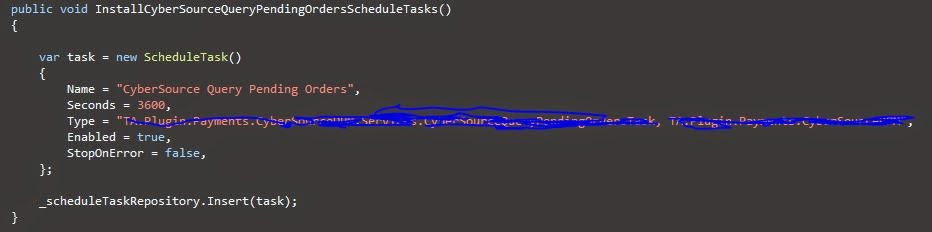
Install Schedule Task

Next, we need to create a schedule task for the task. This can be done by 
the overrides of Nop.Core.Plugins.BasePlugin, In the Install() of my plugin, we will call the following.


Calling Method

For the purpose of demonstration, I am just writing to the log.


Schedule

After installing the plugin, a new schedule task is created as follow. (I have changed the run period to 60 seconds for demo)


Log

Let it run for a few minutes and check the log. It seems quite spot on that it is called every 60 seconds.


Conclusion

There was not much work involved to create a schedule task. All the magic are already done and made available for us from the nopCommerce.

During development, I noticed the TaskManager utilize singleton pattern. It is then responsible to instantiate the instances for the TaskThread. The task threads will run continuously and kick off the Execute() periodically. 

One thing I wanted to do is to compare the performance between Nop Schedule Task vs SQL Server Agent Job. I have a feeling that the sql job may run a little faster as the nop task thread is not a push notification, but simply a continuous running thread.


Contribute to Open Source nopCommerce project via Git

Scope

Since nopCommerce 3.4, the project is now moved from Mercurial to Git. The following shows a little example on how to do it. In this example, I am going to add a field in the DiscountBoxModel so that I can display different color if the discount is applied sucessfully or not. The fork is here.

Codeplex

Fork and pull request were previously discussed here.
http://tech.sunnyw.net/2013/11/contribute-to-mercurial-in-simple-steps.html

Git

Clone

After we fork, the clone command will get latest from remote repository to the local directory.

$ git clone https://git01.codeplex.com/forks/swon/discountboxisapplied
C:\tfs\Nop34> git clone https://git01.codeplex.com/forks/swon/discountboxisapplied
Cloning into 'discountboxisapplied'...
remote: Counting objects: 111111, done.
remote: Compressing objects: 100% (30586/30586), done.
Receiving objects: 100% (111111/111111), 257.70 MiB | 706.00 KiB/s, done.
emote: Total 111111 (delta 81017), reused 107610 (delta 78287)
Resolving deltas: 100% (81017/81017), done.
Checking connectivity... done
Checking out files: 100% (5332/5332), done.
We can verify by ls that we now have the files in local.

$ ls discountboxisapplied
    Directory: C:\tfs\Nop34\discountboxisapplied


Mode                LastWriteTime     Length Name
----                -------------     ------ ----
d----         1/09/2014   5:22 PM            src
d----         1/09/2014   5:19 PM            upgradescripts
-a---         1/09/2014   5:19 PM       2473 .gitignore
-a---         1/09/2014   5:19 PM        980 README.md

Status

After I made some changes to my files in local, the status command will show me the pending changes.

$ git status
# On branch master
# Changes not staged for commit:
#   (use "git add <file>..." to update what will be committed)
#   (use "git checkout -- <file>..." to discard changes in working directory)
#
#       modified:   src/Presentation/Nop.Web/Controllers/ShoppingCartController.cs
#       modified:   src/Presentation/Nop.Web/Models/ShoppingCart/ShoppingCartModel.cs
#       modified:   src/Presentation/Nop.Web/Nop.Web.csproj
#       modified:   src/Presentation/Nop.Web/Themes/DefaultClean/Content/styles.css
#       modified:   src/Presentation/Nop.Web/Views/ShoppingCart/_DiscountBox.cshtml
#
no changes added to commit (use "git add" and/or "git commit -a")

Commit

The commit command will now commit my changes to the repository, but before that happens, this command will cause my editor to popup and I will be able to enter my commit message.
$ git commit -a
[master 6762145] Add an additional IsApplied field to indicate if discount code
is applied successfully.
 5 files changed, 11 insertions(+), 2 deletions(-)

Push

After committing to our local repository, the last thing to do is to synchronize the changes from our local repository to the remote repository. This is done by push.
$ git push
Counting objects: 35, done.
Delta compression using up to 4 threads.
Compressing objects: 100% (18/18), done.
Writing objects: 100% (18/18), 1.68 KiB | 0 bytes/s, done.
Total 18 (delta 14), reused 0 (delta 0)
To https://git01.codeplex.com/forks/swon/discountboxisapplied
   89f0ede..6762145  master -> master

Conclusion

Obviously there are more commands and options in Git. This article only showed the basic operations on how to contribute codes to an open source project.

As a developer that traveling between VSS, SVN, ClearCase, TFS, Mercurial and Git, I am not too excited about what tools are used, but rather what and how can be done. The way how fork and clone, push and pull are certainly innovative for open source platform. I found the commands were simple to use, and easy to remember. The experience was quite nice.

Performance Tuning - nopCommerce Category Page by Caching

Scope

In eCommerce, perhaps the most heavily viewed page is the product listing page (category page). It is the page that draws shoppers attraction, quick glance at the products and prices. We are trying to minimize the load time of the page as the scope of the article.

Benchmark

It is very important for the fact that when it comes to performance tuning, we need to know where we are at and what we want to achieve. During my career, I have seen enough people and including myself that we are trying to optimize the system by modifying a bunch of codes, and the system just 'feels' like running faster without any scientific numbers on the paper.


In our load testing, ignore the first request for the fact that we are initializing the app pool and other bunch of crap that we need to prep for IIS, the average response time is currently at around 8 seconds. Not very impressive!

Another important fact about benchmarking is that we need to set a goal for our performance tuning. I have a goal to take it down to under 2 seconds. Some of my previous big named projects were doing pretty good during Christmas when the local benchmark is at around the 1.5 second mark.

nopCommerce 3.4

nopCommerce 3.4 recently did a performance tuning that boosted the system. Since it is open source, there is no harm for me to have a peek at what they are doing.

I merged some of the code for the CatalogController.Category(). I am so glad to see that they are now refactoring the code in a much nicer way than in version 3.1, much more like a platform now with all the protected virtual methods.

Prior to 3.4, they are caching if a category have any subcategories by using the key CATEGORY_HAS_SUBCATEGORIES_KEY.

In 3.4, they have changed it to cache the actual subcategories by using the key CATEGORY_SUBCATEGORIES_KEY.

This is in fact a very nice move, and was a question that I have been asking for so long. If we bother to cache if we have something or not, why don't we just cache what we have.

Solutions

As usual, I like to take the steps further. There is a lot of calculations and database calls(although already cached like the subcategories above) in the CatalogController.Category() action. I am going to cache the entire CategoryModel used by the action in the cache. The benefit is there is a lot of boxing and unboxing in this method and I am trying to save those as well as the database calls.

Checked in the official forum that they have other concerns for not caching the entire model so that they can cater for wider audience. I don't have that concerns in my business requirement, so I am ready to go for the big cut.

I first refactored the code that gets the CategoryModel called PrepareCategoryModel(). Then I override the methods and add the model to the cache.


Conclusion

By looking at the results side by side, I have to say I am pretty happy with the performance. It is now running 8 times faster than previous; twice faster than what I would have expected at around 1 second.


CyberSource - Login Screen Keep Alive Trick

During development, found a bit frustrated with my CyberSource get timed out too quickly due to their PCI compliance and made me a little unproductive, so I managed to find a little trick to keep my login session alive.

Open the Order Status Notification page with Test Url button. If you know your session timed out, click on the Test Url once before you navigate somewhere else, this little trick actually help generate an "activity" within CyberSource, then you now have an active session again.

Good for developers during development without the hassles of logging in and out where test data are not sensitive information. Not recommended for live environment though.


They maybe fixing this in the future, and I am definitely not reporting this bug to CyberSource for my selfishness. :)