Pages - Menu

Converting a DTD / XSD to strongly typed C# class

We are looking to implement some CyberSource Reporting functions that our system will be able to poll CyberSource for various reports, and call different actions base on the result. After going through the documentations, we know the CyberSource portals are providing us the DTD definitions.

Prerequisite

Implementation

Firstly we will need to download the DTD from the CyberSource portal.
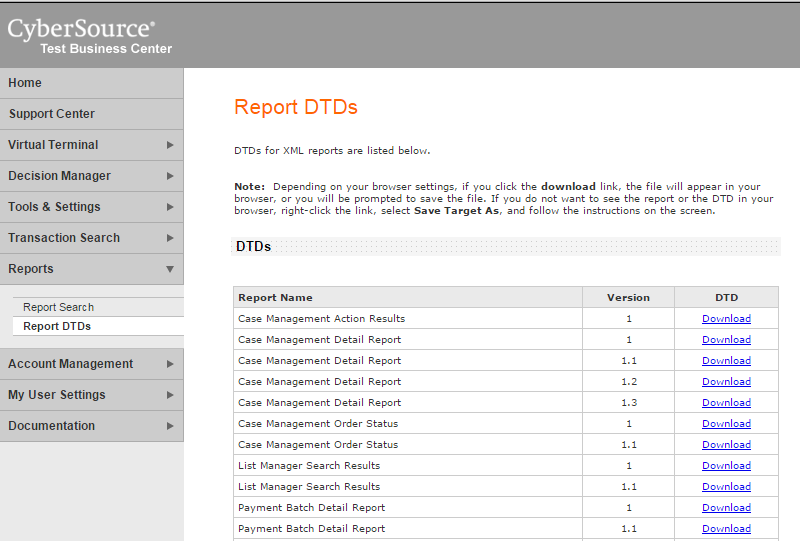

We want to generate the strongly typed model class from the DTD definition, but we will need to convert this into XSD first. This can be done the XML Create Schema function via Visual Studio.


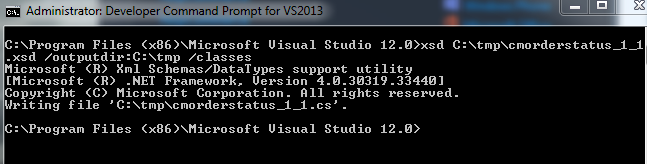
We are now able to generate the C# class by using the XSD.exe. It is available via the Visual Studio Developer Command Prompt.


The generated file will look something like this.


Troubleshooting

[System.InvalidOperationException]: {"<xxx xmlns='some_uri'> was not expected."}

During developments, we got an exception of "There is an error in XML document (0, 0)." and the inner exception is "<Report xmlns='https://ebctest.cybersource.com/ebctest/reports/dtd/cdr.dtd'> was not expected."

This is due to the DTD that we downloaded had a namespace of vendor's live site, therefore our strongly typed class has a name space of the live URI too. However when we are connected to their sandbox, throws an exception as the namespace didn't match.

One approach would be dynamically changing the namespace according to our connections, but I chose an easier way.

Firstly, I removed the namespace from the System.Xml.Serialization Xml Attributes in our generated strongly typed object class.


We will also need to remove the namespace from the incoming xml before we do any deserialization. This can be achieved by creating an extension method to recursively remove all namespaces from all nodes.
private ConversionDetailReport GetConversionDetailReport(string xmlString)
{
    var serializer = new XmlSerializer(typeof(ConversionDetailReport));

    var xDoc = XDocument.Parse(xmlString);

    var xr = xDoc.Root.RemoveAllNamespaces().CreateReader();

    return (ConversionDetailReport)serializer.Deserialize(xr);
}

TFS - Undo a Resolve Conflict During a Merge

Scope

Merge from projA to projB

Our IDE is Visual Studio 2013 and we use Visual Studio Online TFS as our repository.

As our projects grow in omni-direction with developments going on in multiple branches in TFS, I was trying to perform a merge between 2 projects and had some problems in trying to undo resolved conflicts. After I resolved the conflicts and before I commit any changes, there is no option for me to undo any resolved conflicts.

Furthermore, I have also tried the following and none worked for me. Visual Studio still assumes conflicts are resolved even though I did not check in anything.
  • Undo Pending Changes then Merge again. 
  • Delete the working folder, Get Latest then Merge again.
  • Use a different version of Visual Studio then Merge.
  • Shelve changes and Merge again.
  • Delete the working folder. Create a new Workspace with different local folder mapping.
  • Repair (reinstall) Visual Studio.
  • Login with a different account on a different machine.

Solution

After learning that a different login and machine would not solve my problem, I know I am now in serious troubles. It doesn't make much sense that the conflict resolution is recorded anywhere else outside of my computer without me check-in anything, but now it seems the only logical way to think it is happening.
Instead of merging from projA to projB again, I now made a clone of projB by branch out projB to projB-Clone.

I then merge from projA to projB-Clone and I am now getting my Resolve Conflicts screen with x number of conflicts pending my action. After resolving my conflicts, I now need to commit my changes to projB-Clone.

In our projB-Clone, we have all the merged code from projA after the previous merge, we are now ready to merge this changes to projB. As anticipated, there should not be any conflicts, we are literally just copying / replacing files from projB-Clone to projB.

Finally I will merge projA to projB once more to check if they are identical and no conflicts. From this point, we have completed our original attempt of merging projA to projB and it is now safe to delete projB-Clone.

Merge from projA to projB via projB-Clone

Thoughts

It is an unresolved mystery why TFS records conflict results on the server where there were no check-ins or commits. I never had similar issues in other file repository like SVN. The 4 way operations to work around an undo resolve conflicts button? Certainly not appreciated.

Amazon SDK S3 with .Net

Scope

We decided to move our images on our websites from local drive to Amazon S3. This includes all our product images from the e-commerce side; as well as any images or videos that are associated to the CMS side.

Setup and Installation

AWS Toolkit for Visual Studio

  1. Follow the Amazon Setup Guide to install the AWS Toolkit. 
  2. Download and install (or NuGet) AWS SDK for .Net.
  3. Configuring AWS Credentials
  4. Use the Amazon Endpoint List to configure the end point
  5. The Amazon SDK API documentation is pretty easy to read.

Code

Upload an object

By using the Amazon SDK, We change our file service to put files to S3 instead of saving to local folder. It divides into 2 parts. We will prepare the PutObjectRequest and call AmazonS3Client.PutObject() to upload the file.

public override HttpStatusCode UploadPicture(string targetPath, string sourcePath)
{
    // Create a PutObject request
    var request = new PutObjectRequest
    {
        BucketName = bucket,
        Key = targetPath.ToLower(),
        FilePath = sourcePath,
        CannedACL = S3CannedACL.PublicRead
    };

    try
    {
        using (var client = new AmazonS3Client(Amazon.RegionEndpoint.APSoutheast2))
        {
            // Put object
            PutObjectResponse response = client.PutObject(request);

            return response.HttpStatusCode;
        }
    }
    catch (Exception ex)
    {
        // logging and exception handling....
    }

    return HttpStatusCode.NotFound;
}

S3CannedACL is a predefined Access Control List that allows access to be set on S3 objects.

Access an object

To access an object in s3 is much easier. You will just need to know the url and have the correct ACL setup.

The URL format is in a form of http://{mybucket}.s3.amazonaws.com/{mykey} 

mybucket is the bucket name and mykey is the key (file path) to the object.


The Quickest Way to Bulk Create AWS S3 Buckets

I am in a mission of creating a bunch of s3 buckets in bulk. I could just use the web interface and do it manually. I reckon I can get the job done in around 30 minutes, but I am looking for a more an IT way to do it.

Solution

After a quick look around, I think I can use the Command Line Interface.

Download and Setup


Configure


Run the aws configure command to create a default profile. Fairly straight forward.

$ aws configure
AWS Access Key ID [None]: AKIAIOSFODNN7EXAMPLE
AWS Secret Access Key [None]: wJalrXUtnFEMI/K7MDENG/bPxRfiCYEXAMPLEKEY
Default region name [None]: us-west-2
Default output format [None]: json

A list of region name can be found here.

Commands


http://docs.aws.amazon.com/cli/latest/reference/s3/index.html

I use the ls command to pull out a list of my buckets.

$ aws s3 ls

In order to create buckets, the command I need is mb.

$ aws s3 mb s3://mybucket

I prepared my list of commands by using Excel / Find and Replace.

$ aws s3 mb s3://sunnyw.net.dummy1
$ aws s3 mb s3://sunnyw.net.dummy2
$ aws s3 mb s3://sunnyw.net.dummy3

And I just copy and paste into the console.

PS C:\Program Files (x86)\AWS Tools\PowerShell\AWSPowerShell> aws s3 mb s3://sunnyw.net.dummy1
make_bucket: s3://sunnyw.net.dummy1/
PS C:\Program Files (x86)\AWS Tools\PowerShell\AWSPowerShell> aws s3 mb s3://sunnyw.net.dummy2
make_bucket: s3://sunnyw.net.dummy2/
PS C:\Program Files (x86)\AWS Tools\PowerShell\AWSPowerShell> aws s3 mb s3://sunnyw.net.dummy3
make_bucket: s3://sunnyw.net.dummy3/
PS C:\Program Files (x86)\AWS Tools\PowerShell\AWSPowerShell>

I didn't need any fancy API calls or build any C# console. If the requirement was more complicated, I could put those logics in PowerShell script. Simple is Good!!

Amazon Web Services - AWS101


Recently had a meeting with the Amazon expert discussing about our AWS needs. We had a brief overview of all the relevant AWS services. There were many jargon involved, I already know some of them, but not all. Mostly are just product names.

Region and Availability Zone

Availability Zone is a physically isolated location or what traditionally called data centre. In an ideal setup we would split our instances into 2 AZs for redundancy. I was told the connection between the AZs are dark fiber and latency at single digit millisecond.

Amazon region can have multiple AZs. See the difference between Region and Availability Zone.

Elastic Load Balancing

ELB is the amazon version of network load balancing. It sits in front of AZs and redirects traffics to different AZs.

CloudWatch

Amazon CloudWatch is normally what I refer to as website monitoring. It does health check on the system and sends alert to ELB for traffic control.

EC2 (Elastic Compute Cloud)

EC2 are virtual machines. We can setup IIS on EC2 instance(s) to host our websites. When we spin up an EC2 instance, we can choose from a range of predefined images with different operating system and applications.

Amazon Machine Image

I will interpret AMI as a fancy name for a machine snapshot image or known as ghost image in old fashion. We can use it to scale out our system or simply for backup / restore strategy.

Relational Database Service

RDS is what I would call a managed database instances. It is an already setup database instance and I can utilize without managing a real database instance that I need to rdp in or patch.

S3 (Simple Storage Service)

I am a little more familiar with S3 because my site is hosted by using the S3 bucket. S3 is a plain cloud file storage. Some people misinterpret S3 as CDN, because it can potentially be utilized as CDN for saving bandwidth, but there is a difference.

S3 does not utilize edge servers for faster content delivery. It only has one copy of the files in one location. It is however designed for high performance to serve static files (eg. images, video etc), and also cheaper rate as no compute hours are charged.

CloudFront

The Amazon version of CDN that does edge caching is actually called CloudFront. It is designed to deliver S3 contents to end users via edge servers.

Simple Email Service

SES is a SMTP service for sending out emails.

CloudFormation

I will describe CloudFormation as a non-UI way to create and instantiate different kind of Amazon Services. For example, we can create a EC2 instance by just writing a script in CloudFormation format and run it via the console.

C# .Net Cannot close stream until all bytes are written.

Scenario

We are dealing with the Stream class in .Net and run into an inner exception of "Cannot close stream until all bytes are written."

Code

try
{
    using (var ms = new MemoryStream())
    {
        xElement.Save(ms);

        // Create a PutObject request
        var request = new PutObjectRequest
        {
            BucketName = bucket,
            Key = key,
            InputStream = ms
        };

        // Call S3 ....
    }
}
catch (Exception ex)
{
    _logger.Error(ex.Message, ex);
    throw ex;
}

By using the keyword using, we are expecting .Net will handle the close connection for us.

Rather than unable to close the stream, it was actually a problem where the position of the MemoryStream was at the end after the XElement.Save(). We need to manually reset the position of the stream to zero, so that it can be written to the PutObjectRequest object.

xElement.Save(ms);
ms.Position = 0;


SQL - How to do a CHARINDEX in reverse

I am a little surprise when SQL 2012 have introduced functions like TRY_CONVERT, but there are still no built-in functions to perform a CHARINDEX in reverse.

Code

Select UrlRecord.Slug
, LEN(UrlRecord.Slug) [Length]
, CHARINDEX('-', UrlRecord.Slug, 0) [Normal CHARINDEX]
, LEN(UrlRecord.Slug) - CHARINDEX('-', Reverse(UrlRecord.Slug), 0) + 1 [Reverse CHARINDEX with bug]
, IIF(CHARINDEX('-', UrlRecord.Slug, 0) = 0, 0, LEN(UrlRecord.Slug) - CHARINDEX('-', Reverse(UrlRecord.Slug), 0) + 1) [Desired CHARINDEX]
from UrlRecord
where EntityName = 'Category'
Order by Slug


In the above code, we are trying to find the last position (a charindex in reverse order) of a dash '-' from a string (UrlRecord.Slug).


  • Row 68, for a string that have only one matching character '-', either direction will return the same result.
  • Row 72, a Reverse CharIndex will return 10 for the last occurrence as opposed to a CharIndex that will return 5 for the first occurrence.
  • Row 77, there is a bug when we calculate the reverse but no matching string, it will return the full length. We will do a IIF check to return 0 when there is no match.


The final code became this.

Declare @matchChar varchar(1) = '-'
Declare @sourceString varchar(max) = 'test-test-test'

Select IIF(CHARINDEX(@matchChar, @sourceString, 0) = 0, 0, LEN(@sourceString) - CHARINDEX(@matchChar, Reverse(@sourceString), 0) + 1)

Performance

I did not pay attention to performance at all. I am sure there are rooms for improvement, but I am thinking a built-in function for such a simple operation is probably overdue by Microsoft anyway.