Pages - Menu

Showing posts with label Redux. Show all posts

Using redux-persist to Persist and Rehydrate

Scope

Our product listing page is async loaded by react ajax calls. We want to handle a 'browser back button' scenario that when the user click back, the ajax parameter will persist and the same products can be loaded on the page. A common problem when making ajax call that would change a page content after the page loaded.

Code

Setup

Install redux-persist and follow the doc to setup the enhancer.

In order to achieve what we want, we need to first persist our state somewhere, then retrieve and rehydrate the state.

Persist

As opposed to the blacklisting example, we are doing it by whitelisting.

persistStore(store, {whitelist: ['myReducer1', 'myReducer2']}, () => {
  console.log('redux-persist rehydrated')
})

Redux-persist will raise an action called 'persist/REHYDRATE' and we need to create a reducer to handle this.

import {REHYDRATE} from 'redux-persist/constants'

const reduxPersist = (state, action) => {
  if (state == undefined)
  {
    return Object.assign({}, state, null)
  }

  switch (action.type) {
    case REHYDRATE:
      if (action.payload.myReducer1 && action.payload.myReducer2) {
        return Object.assign({}, state, {
          myReducer1: action.payload.myReducer1,
          myReducer2: action.payload.myReducer1
        })
      }
      return state
  }
}
export default reduxPersist

This will persist our state in a state called reduxPersist. It is a preserved keyPrefix for the localstorage default key, so that autoRehydrate can retrieve the persisted state.

Only myReducers are persisted, others are not persisted.

Auto Rehydrate

We can rehydrate a state either by using autoRehydrate or manually doing it.

To setup autoRehydrate, we just need to add an enhancer to our store. Then our state tree is automatically rehydrated when we reload the page.

const store = createStore (
    combinedReducer, 
    undefined,
    compose(
        applyMiddleware( thunk, logger ),
        autoRehydrate()
    )
)

Manual Rehydrate

Who likes driving manual transmission these days? I do and it gives me more granular control over what I want to achieve.

To setup manual rehydrate is not as hard as it sound. We just need to pass in the reduxPersist payload in the action and utilize it in the reducer.

In the action,

return {
  type: 'UPDATE_MY_FIELDS',
  myFields: somefields,
  payload: payload
}

In the reducer,

case 'UPDATE_MY_FIELDS':
  var shouldReadCache; // some boolean custom logics
  if (shouldReadCache)
  {
    return Object.assign({}, state, {
      myFields: action.payload.myReducer1.myFields
    })
  }
  else {
    return Object.assign({}, state, {
      myFields: action.myFields
    })
  }

Conclusion

Auto rehydrate works out of the box like a charm if implemented correctly, but manual rehydrate still has its place especially for more complicated scenarios. I did not run into race conditions like other people did, but our fetch calls are usually wrapped by using the promise.

Redux Form - How to Set Checkbox Initial Value

Scope

We have a very simple requirement that wants to conditionally default the checkbox to checked for our checkout page.


Troubleshooting

Since we use react/redux, so naturally we use redux-form (currently at v6.8.0) for our form fields.

For a checkbox, our code will be like this.

<Field name={this.props.fields.addToAddressBook}
 id={this.props.fields.addToAddressBook}
 component="input"
 type="checkbox"
 checked={this.props.isAddToAddressBook}
 value={this.props.isAddToAddressBook}
 onChange={(e) => this.handleIsAddToAddressBook(e)}
/>

My state has the isAddToAddressBook: true.


However, in my console, the value is null even when the checkbox is checked.


Arguably we can use the checked field instead of the value, but Demandware doesn't allow that, so let's fix the value.

Tried a few different ways and still getting empty value.

value={this.props.isAddToAddressBook.toString()}

value={this.props.isAddToAddressBook ? 'true' : 'false'}

I also tried using defaultValue,

defaultValue={this.props.isAddToAddressBook}

it sets the defaultValue but not the value.


Solution

<input className="form-indent label-inline"
 name={this.props.fields.addToAddressBook}
 id={this.props.fields.addToAddressBook}
 type="checkbox"
 checked={this.props.isAddToAddressBook}
 value={this.props.isAddToAddressBook}
 onChange={(e) => this.handleIsAddToAddressBook(e)}
/>

Surprisingly and ironically, the solution is not to use redux-form field but normal redux binding.

Not an elegant solution if you need to write your own validation handler, but if validation is not required, this is actually cleaner. If it doesn't need to be in redux-form; then it shouldn't be in redux-form.

Reference

  • https://github.com/erikras/redux-form/issues/334
  • https://stackoverflow.com/questions/41452053/in-redux-form-how-can-i-set-the-initial-value-of-the-checked-property-of-a-chec

Demandware - Migration from jQuery to React

Running React only. jQuery is not defined

Scope

Our production website was using an uncompressed and unminified 7000+ lines of jQuery file that do a lot of DOM manipulation.The site was slow and a lot of overhead with the javascript.

We recently migrated our site from jQuery to React with the following goals in mind.
  • Reduce file size
  • Improve on load speed
  • DOM rendering time
  • Improve readability and maintainability of the code

7000+ lines of jQuery

React vs Angular

Perhaps one of the hardest decision I have to make is to choose between React and Angular. There are already many great articles talked about this topic and this is one of them.

The two technologies are pretty much head to head. My reason for React over Angular was more a cultural than technical reason.

Technical

Technology Stack

  • Demandware
  • React / Redux / Thunk / React Habitat
  • ES6
  • Webpack

Non-SPA

React is designed for Single Page Application, but our site is not. The complexity and integrity of an e-commerce site do not marry well with the SPA architecture.

For a non-SPA site using the React framework, javascript will throw exception if a component is not found. A SPA site will not have this issue because all components are available on the single page.

To overcome this problem, we are using the React Habitat Redux. In a nutshell, it is a layer that will help "hiding" components that are not needed for the page, thus no error for components not found.

On a typical Demandware isml page, our source code will look like this.

<isscript>
 var data = {
  "link": URLUtils.url('Cart-Show').toString(),
  "message": Resource.msg('global.notification.addtobag', 'locale', null)
 }
 var dataJson = JSON.stringify(data);
</isscript>

<div data-component="Notification_Container" data-prop-data="${dataJson}"></div>

In react, we will render our html by using this.props.

render () {
 return (
  <div className="notification-wrapper">
   <div className="message">
    {this.props.data.message}
   </div>
   <div className="action">
    <a href={this.props.data.link}>View Bag</a>
   </div>
  </div> 
 )
}

Dev tools

3rd party components

The fun part of using React is to explore 3rd party (open source) components for your need. Here is a list of some of the more important ones.

IE 10, IE 11 and Safari

Some of the ES6 commands are not supported by IE 11 and Safari. We added some polyfill to our webpack and conveniently it also works for IE 10.

IE 8 and IE 9

\@_@/

IE < 8

|Orz

Firefox

In developments, we found some of the components were not rendering in Firefox. Issues were intermittent and happening about 1 out of 10 times on a page with more data.

We webpack our js in production mode and the problem has gone away since.

Demandware Content Assets

Content assets were converted in a similar manner to other isml pages but in a better way. There are no more ad-hoc includes for random jQuery plugins. Rather, we write dedicated components to handle and support features that we want to make available to content assets.

All of these are bundled in one single bundle.js file so we can leverage client-side browser cache for performance gain.

In our content asset, we select HTML type and simply include the <div> container.

<script>
var json = {
 cid: 'my-content-asset-id',
 items: [
  {
   title: 'Do I need to be home for my delivery?',
   html: '<p>Some answers to the question...</p>'
  },
  {
   title: 'I have a Missing / Lost Order',
   html: '<p>Some more answers to another question...</p>',
  }
 ]
}
</script>

<div data-component="Your_Container_Name" data-r-prop-fields="json"></div>

Similar to what we previously done to isml, but we will use javascript json to hold all the properties by using React Habitat data-r-prop. Notice the difference in using <script> instead of <isscript> as it is not a Demandware script.

Demandware Content Slots

Content slot in Demandware is a small widget that is time-based and user segmented. For HTML type, we convert the HTML similar to content asset. For other types, they will just work fine.


One Page Checkout

Last year, we have done a Demandware - Converting Multi-steps Checkout to One Page Checkout. To convert this to React, we simply replace our jQuery.ajax() by React component with Fetch.

Google Geocoder

We use Geocoder in our store locator to display a google map for our stores. During our development, we found a race condition that sometimes the Geocoder callback is returning too late and the DOM is already re-rendered, so we wrote our own GeocoderPromise that wrapped the Google Geocoder in Promise object. 

Tealium

Some of our tags were firing off on DOM ready event, which is now lazy loading in React. We had to implement our own redux-tealium to help manually triggering tags.

Thoughts

There were a few stress points during the migration.
  • Learning curve of new technology
  • Lack of learning materials about Demandware React integration. Almost no one has done it before if asking around in Demandware XChange.
  • Using Demandware in non-SPA architecture
  • Overly complicated to do something simple (eg. show/hide elements or popup modal written in React)
Was it worth the effort? Definitely.
  • Code is now more readable and maintainable
  • Some of our jQuery plugins are overdue for updates (which we don't need to do anymore)
  • Reducing number of jQuery plugins into a handful of React components
  • No more random jQuery events firing off because hidden code buried deep somewhere
  • Significant overall performance gain


Demandware - Ajax Fetch Form Post in React

Scope

Previously, we did a mini project for Demandware - Converting Multi-steps Checkout to One Page Checkout

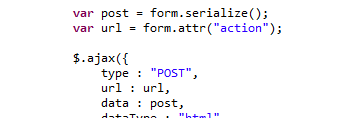
Ajax post was done by using jQuery as that is the standard javascript framework in Demandware. As we are migrating from jQuery to React, we no longer have the luxury to use $.ajax().


Technical

In our ES6/Javascript, we will use fetch to perform our form post. In React/Redux, we will do this in our action.

By not using jQuery framework, we also no longer be able to use the .serialize() to serialize the Form object. This will need to be done by Vanilla JS and I have found a library just do exactly that. :)

Code


import serialize from 'form-serialize'

export const postFormAjax = (actionUrl) => {
 
 var myForm = document.getElementById('my-form')
 var data = serialize(myForm)
 
 return dispatch => {
 
  var init = {
   credentials: 'same-origin',
   method: 'POST',
   headers: { 'Content-Type': 'application/x-www-form-urlencoded' },
   body: data
  }

  return fetch(actionUrl, init)
   .then(response => console.log(response))
 }
}

Note

  • In the above code, I passed in the actionUrl to my javascript from my Demandware isml by URLUtils.continueURL().toString().
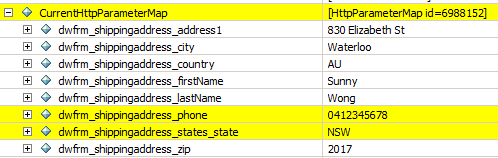
  • We need to manually set the content-type header, otherwise pdict.CurrentHttpParameterMap will be empty.
  • I was trying to use FormData, but I couldn't get it to work with latest Chrome and Demandware. I ended up with bunch of WebKitFormBoundary string that was not usable.


Result

I implemented the above in React and I am able to parse form data correctly in Demandware.


In our checkout page, I can dispatch actions to disable/enable the correct panels while performing ajax post back in the background.